
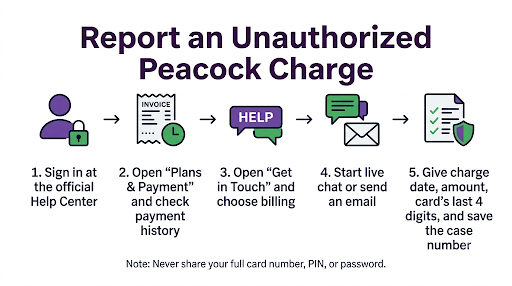
To report an unauthorized Peacock charge, sign in at peacocktv.com, open the Help Center, and use the Get in Touch page to start a live chat or send an email. Live chat agents are available from 9:00 AM to 1:00 AM ET, and you can also message @PeacockTVCare on X. Peacock does not list a public customer service phone number, so live chat is the fastest way to reach a real person about billing.
Before you contact support, take two minutes to find out who actually billed you. Many “unauthorized” Peacock charges come from Roku, Apple, Google Play, Amazon, or a cable provider like Xfinity, and Peacock can’t refund those directly. This guide shows you how to identify the charge, who to contact, what to say, and what to do if Peacock won’t help.
Quick Overview
| Your situation | Who to contact | Where |
| Charge shows as PEACOCK, PEACOCKTV, or NBCUniversal and you pay Peacock directly | Peacock | Live chat or email from the Get in Touch page in the Peacock Help Center |
| Charge shows as ROKU *PEACOCK or “Billed by Roku” | Roku | my.roku.com, Manage your subscriptions |
| Charge shows as APPLE.COM/BILL | Apple | reportaproblem.apple.com |
| Charge comes through Google Play or Amazon | Google or Amazon | Your Google Play or Amazon subscriptions page |
| Peacock is billed on your Xfinity or other provider bill | Your provider | Your provider’s account or billing support |
| You have no Peacock account at all, or support can’t find the charge | Your bank or card issuer | Dispute the charge as fraud and request a new card |
How Do You Contact Peacock Customer Service About an Unauthorized Charge?
The official way is through Peacock’s Help Center. Sign in first, because the chat and email options work best when the agent can see your account.
- Go to the Peacock Help Center on a computer or phone browser.
- Sign in with the email address you think is linked to the charge.
- Open the Get in Touch page.
- Choose a billing or payment topic.
- Start a live chat during support hours, or send an email message if it’s after hours.
What Are Peacock’s Customer Service Hours?
Peacock’s live chat support runs 7 days a week, from 9:00 AM to 1:00 AM Eastern Time. If you’re on the West Coast, that’s 6:00 AM to 10:00 PM Pacific. Email messages can be sent anytime, but replies take longer than chat.
Does Peacock Have a Customer Service Phone Number?
No. Peacock’s official contact page lists live chat, email, and social support, not a phone line. You’ll see phone numbers posted on review sites, complaint forums, and blog platforms that claim to be “Peacock billing support.” Be careful with these. Some are unverified, and some are run by third parties who may ask for your card number or remote access to your device. Peacock agents will never need your full card number over chat to look up a charge.
Can You Contact Peacock on Social Media?
Yes. Peacock’s official support account on X (Twitter) is @PeacockTVCare. It’s useful if chat is down or you’re not getting a response. Send a direct message, not a public post, and never share card details, your password, or your full address publicly.
How Do You Check If the Charge Is Really From Peacock?
Start by matching the charge on your bank statement to your Peacock payment history. This step tells you whether it’s a real Peacock subscription, a duplicate, or something else entirely.
- Sign in at peacocktv.com.
- Click your profile icon and select Account.
- Go to Plans & Payment.
- Select View Payment History to see every charge on that account.
If the charge isn’t there, check other email addresses you use. A family member may have signed up with an old email and your saved card.
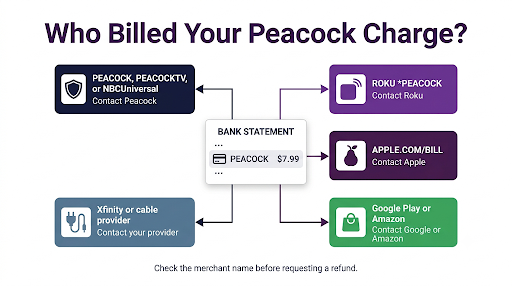
What Does a Peacock Charge Look Like on a Bank Statement?
The name on your statement depends on how the subscription was purchased. Common versions include:
- PEACOCK, PEACOCK TV, or PEACOCKTV
- NBCUNIVERSAL PEACOCK or a similar NBCUniversal label (Peacock is owned by NBCUniversal)
- ROKU *PEACOCK or “Peacock, Billed by Roku”
- APPLE.COM/BILL for subscriptions made on an iPhone, iPad, or Apple TV
- PAYPAL *PEACOCK if you paid with PayPal
Also watch out for look-alike names. “Peacocks” is a separate UK clothing retailer, and charges from it have nothing to do with Peacock TV.
Why Are You Seeing a Peacock Charge You Didn’t Authorize?
Most surprise Peacock charges have an ordinary cause. True fraud happens, but it’s less common than these:
- A free trial or promo ended. When a trial or promotional period expires, Peacock charges the regular subscription price to the payment method on file unless you canceled first.
- A free-with-cable perk changed. Peacock included with Xfinity or another provider can lapse or get upgraded, and billing may start without much notice.
- Two separate subscriptions. You might pay on peacocktv.com while someone in your home also subscribed through Roku, Apple TV, or a Fire TV stick. That’s two charges for the same service.
- Premium and Premium Plus both active. Peacock confirms that two charges can appear when one is for Premium and the other is for Premium Plus.
- An annual plan renewed. A yearly charge is much larger than a monthly one and is easy to forget.
- Someone used your card. If you have no account, no family member subscribed, and the amount doesn’t match any plan, treat it as possible fraud.
What Should You Say When You Contact Peacock Support?
Be specific. Agents resolve billing chats faster when you give them everything up front. Have this ready:
- The date and exact amount of each charge
- The merchant name as it appears on your statement
- The last four digits of the card (never the full number)
- Every email address you might have used for Peacock
- A screenshot of the charge with other transactions hidden
Here’s a simple message you can paste into chat or email:
“Hi, I see a Peacock charge of $[amount] on [date] on my card ending in [last four]. I did not authorize this charge. Please check whether this card is linked to any Peacock account, cancel any active subscription tied to it, and refund the charge. My account email is [email].”
Ask the agent for a case or reference number before the chat ends, and save a copy of the transcript. You’ll need both if you later dispute the charge with your bank.
Will Peacock Refund an Unauthorized Charge?
Sometimes, but it isn’t guaranteed. Peacock’s Terms of Use say no prorated refunds or credits are issued unless the law requires it or you made an immediate upgrade. Refunds for billing errors are handled case by case.
Your odds are better when:
- You report the charge quickly, ideally within a few days
- You haven’t streamed anything on the account since the charge
- You can show a duplicate subscription or a billing error
- You can show you never had an account at all
Even if Peacock declines a refund, cancel the plan right away so the next billing cycle doesn’t hit. To avoid another charge, you must cancel no later than the day before your next billing date. After cancellation, you usually keep access until the end of the period you already paid for.
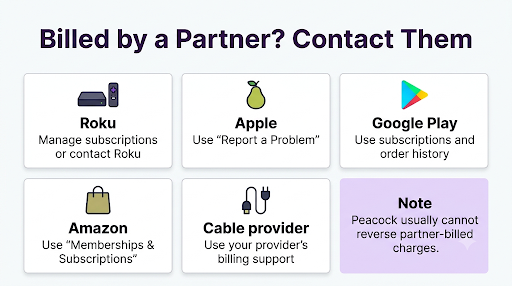
What If You Were Billed Through Roku, Apple, Amazon, or Xfinity?
If a third party billed you, Peacock support usually can’t see or refund that payment. You need to go to the company that took the money.
Roku
Sign in at my.roku.com, open Manage your subscriptions, and cancel Peacock. For a refund request on an unrecognized Roku charge, contact Roku’s billing support from the same account.
Apple
Go to reportaproblem.apple.com, sign in with your Apple ID, and choose the option to request a refund or report an unrecognized charge. You can also cancel in Settings, then your name, then Subscriptions.
Google Play and Amazon
Cancel from the Subscriptions section of your Google Play account or the Memberships and Subscriptions page on Amazon, then use that store’s help options for a refund request.
Xfinity and Other Providers
If Peacock shows up on your Xfinity bill, manage it from your Xfinity account or call Xfinity’s billing support. If Xfinity confirms your Peacock plan should be included at no cost, then reach out to Peacock to review the separate charge.
The same “find who billed you first” approach applies to other streaming services too. If you’ve had a similar problem with HBO’s service, our guide on contacting Max customer service for a billing issue walks through that process.
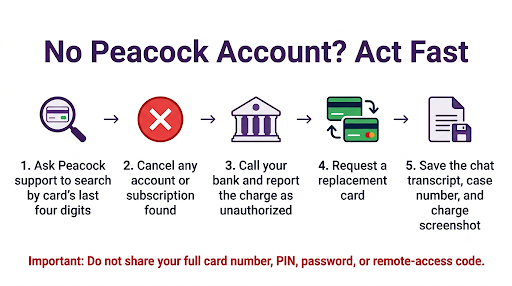
What Should You Do If You Don’t Have a Peacock Account?
If you’ve never signed up and Peacock can’t find an account linked to your card, act fast. This points to card misuse, not a subscription mix-up.
- Ask Peacock support to search by your card’s last four digits and any email you use. Ask them to cancel anything they find.
- Call the number on the back of your card and report the charge as unauthorized.
- Request a new card number. If one charge went through, others may follow.
- Review your other recent transactions. Small test charges often come before bigger ones.
- Change your email password. If someone got into your email, they may have created accounts in your name. If you think your email was compromised, see our guide on contacting Yahoo Mail support about a hacked account.
When Should You Dispute a Peacock Charge With Your Bank?
Dispute with your bank or card issuer if Peacock (or the third-party store) refuses to help, can’t locate the charge, or you believe the charge is fraud. Card issuers usually want to see that you tried to resolve it with the merchant first, so your chat transcript and case number help.
Timing matters. Under federal law, you generally have 60 days from the date your credit card statement was sent to dispute a billing error in writing. Debit cards follow different rules, and your liability can grow the longer you wait to report an unauthorized charge. The FTC explains both in its guide to using credit cards and disputing charges.
One heads-up: a chargeback can lead Peacock to suspend the account tied to that payment. If it’s a real account you plan to keep using, try support first.
Common Mistakes to Avoid
- Calling a random “Peacock support” number from a search result. Stick to the official Help Center, chat, and @PeacockTVCare.
- Canceling before you screenshot your payment history. Save proof first.
- Only checking one email. Old emails and family members’ emails are the most common source of “mystery” accounts.
- Asking Peacock to refund a Roku or Apple charge. They can’t. Go to the store that billed you.
- Waiting until next month. Delays reduce your refund chances and can shorten your dispute window.
- Deleting the account instead of canceling the plan. Cancel the paid plan first, confirm it, then decide whether to close the account.
Billing problems with phone carriers follow a similar pattern of documenting, escalating, and then disputing. If you’re also sorting out a wireless bill, see how to speak to a live person at AT&T about wireless billing.
Frequently Asked Questions
Can I talk to a live person at Peacock about billing?
Yes, through live chat. After you sign in and open the Get in Touch page, chat connects you with a live agent during support hours. There’s no official phone line, so chat is the closest thing to a phone call.
How long does a Peacock refund take to show up?
If Peacock approves a refund, it goes back to the original payment method. Most banks post card refunds within several business days, but some take one or two billing cycles. If it hasn’t shown up after about 10 business days, follow up in chat with your case number.
Why was I charged by Peacock after I canceled?
Usually one of three reasons: you canceled on or after the billing date, you canceled one subscription but a second one is still active through Roku, Apple, or another store, or your cancellation didn’t fully go through. Check Plans & Payment for a confirmation and check every app store you use.
Can I get a refund for a Peacock annual plan I forgot about?
It’s possible but not guaranteed, since Peacock doesn’t issue prorated refunds by default. Contact support right after the renewal posts and before you watch anything. Explain that you didn’t intend to renew. Fast, polite requests have the best chance.
Can I contact Peacock support from the app on my TV?
The TV app has limited help options. It’s easier to open the Peacock Help Center on your phone or computer, sign in, and start chat there. If you’re curious how this compares with other services, here’s how to contact Netflix customer service from the Netflix app.
Will disputing the charge cancel my Peacock subscription?
No. A bank dispute only challenges the payment. The subscription can stay active and keep billing a new card if one is on file. Always cancel the plan yourself in Plans & Payment or through the store that bills you.
Does Peacock charge for the free plan?
Peacock’s current lineup is built around paid plans like Premium and Premium Plus. If you’re being charged and expected not to be, check whether a trial, a promo, or a cable perk recently ended and switched you to a paid plan.
Final Recommendation
Start by checking Plans & Payment on peacocktv.com and matching the charge name on your statement. If Peacock billed you directly, open a live chat from the Get in Touch page between 9 AM and 1 AM ET, give the exact amount and date, and ask for cancellation and a refund. If Roku, Apple, Amazon, Google, or your cable provider billed you, go to them instead. If no one can find the account or the request is denied and you believe it’s fraud, call your card issuer, dispute the charge, and replace the card. Act within days, not weeks.