
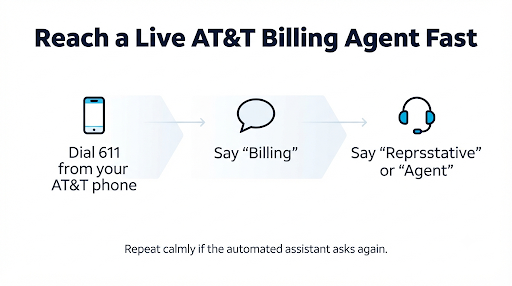
To speak to a live person at AT&T about wireless billing, call 800.331.0500 or dial 611 from your AT&T phone. When the automated assistant answers, say “billing,” then say “representative” or “agent.” Repeat it if you need to. Billing reps work Monday to Friday, 8 a.m. to 8 p.m. CT, and Saturday to Sunday, 9 a.m. to 7 p.m. CT.
That’s the short version. The rest of this guide shows you how to skip the phone tree, which number fits your account type, what to have ready, and what to do if the first rep can’t fix your bill. That last part is where most people get stuck.
Quick Overview
- Postpaid wireless billing: 800.331.0500 or 611 from your AT&T phone
- Billing rep hours: Mon to Fri, 8 a.m. to 8 p.m. CT; Sat to Sun, 9 a.m. to 7 p.m. CT
- Prepaid billing: 800.901.9878, or text “prepaid” to 75421 to chat
- Calling from outside the U.S.: +1.314.925.6925 (available 24/7)
- Fastest phrase to say: “Billing,” then “representative”
- Prefer typing? Use live chat on AT&T’s support page and type “agent” or “human”
- Have ready: account number, wireless passcode, the bill date, and the exact charge you’re questioning
Which AT&T Number Should You Call for Your Billing Issue?
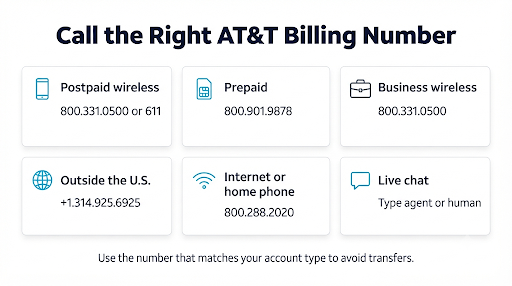
Call the number that matches your account type. Calling the wrong line is the most common reason people get transferred two or three times before reaching the right person.
| Your situation | Number or channel | Hours |
| AT&T postpaid wireless bill (monthly plan) | 800.331.0500 or 611 from an AT&T phone | Billing reps: Mon to Fri, 8 a.m. to 8 p.m. CT; Sat to Sun, 9 a.m. to 7 p.m. CT |
| AT&T Prepaid account | 800.901.9878, or text “prepaid” to 75421 | Text chat: Mon to Sat, 9 a.m. to 11 p.m. ET; Sun, 10 a.m. to 11 p.m. ET |
| Business wireless account | 800.331.0500 (AT&T Business wireless support) | Varies by account type |
| Traveling or living outside the U.S. | +1.314.925.6925 (free from your AT&T wireless phone) | 24/7 |
| AT&T Internet or home phone bill (not wireless) | 800.288.2020 | Varies by service |
Good to know: AT&T’s general support listing says wireless support runs 24/7.
That’s true for the automated system and some tech help. But the bill and account team keeps the narrower hours shown above. If you call at 11 p.m. about a disputed charge, you’ll likely reach the automated assistant, not a billing rep. You can confirm current hours on the AT&T Wireless support page.
How Do You Get Past AT&T’s Automated System to a Real Person?
Say “billing” first, then “representative” or “agent” when the assistant tries to solve the issue itself. AT&T’s voice system is built to handle simple tasks like checking a balance or making a payment, so it will often try once or twice before transferring you.
Step-by-step: reaching a billing rep by phone
- Call from your AT&T phone if you can. Dialing 611 lets the system recognize your number, which can skip part of the identity check.
- Say “billing” when asked what you’re calling about. This routes you to the bill and account queue instead of general support.
- Say “representative” or “agent” when the system offers to read your balance or send you a text link.
- Repeat it calmly if the assistant asks again. Many callers report that a second or third request triggers the transfer.
- Try pressing 0 if voice commands aren’t working. Some callers say pressing 0 a few times (or 0 then #) helps, though AT&T changes its menus and this isn’t guaranteed.
- Verify your identity with your wireless passcode or a one-time code sent to your phone.
- Ask for a callback if the hold time is long and the option is offered. You keep your place in line without staying on hold.
A quick tip: Be specific when the system asks why you’re calling. “Billing, wrong charge on my bill” tends to route better than a long explanation. The assistant listens for key words, not full stories.
Can You Chat With a Live AT&T Billing Agent Instead of Calling?
Yes. AT&T offers live chat from its support pages and the myAT&T app. Chat starts with a virtual assistant, but you can ask for a human by typing “agent,” “representative,” or “human.”
Chat has a few real advantages for billing problems:
- You get a written record. Save or screenshot the transcript. If a rep promises a credit, you have proof.
- You can paste exact details. Charge amounts, dates, and line numbers are easier to share in writing.
- You can multitask. No need to sit on hold with a phone pressed to your ear.
The downside? Complex disputes sometimes get handed off from chat to a phone call anyway. If your issue involves multiple lines, a promo that never applied, or several months of errors, a phone call is often faster.
What Should You Have Ready Before You Call AT&T Billing?
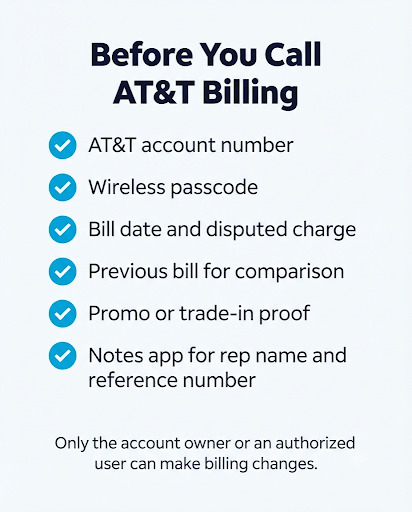
Have your account details, the specific charge, and the bill it appeared on. Being prepared can cut your call time in half, because the rep won’t have to dig for what you mean.
- Your AT&T account number (on your bill or in the myAT&T app)
- Your wireless passcode or access to the phone that will receive a verification code
- The bill date and the exact charge you’re asking about, with the amount
- Your previous bill to compare against, if the total suddenly jumped
- Proof of any promise or promo, such as a store receipt, order confirmation, or chat transcript
- A pen or notes app to record the rep’s name, the date, and any reference number
Important: Only the account owner or an authorized user can make billing changes. If you’re on a family plan but not listed as authorized, the rep may only be able to give you limited information. Ask the account owner to join the call or add you as an authorized user first.
What Should You Say to Get Your Billing Problem Fixed?
State the problem, the amount, and what you want done in your first 20 seconds. Reps handle many calls, so a clear request helps them act fast.
Here’s a simple script you can adjust:
“Hi, I’m calling about my wireless bill dated [month]. There’s a [$amount] charge for [item] that I don’t recognize / that shouldn’t be there. I’d like it reviewed and credited. Can you tell me what it’s for?”
Common AT&T wireless billing issues and what to ask for
| Problem | What to ask the rep |
| Bill went up with no plan change | “Can you walk me through what changed from last month’s bill?” |
| Promo credit or trade-in credit missing | “My [promo name] credit isn’t showing. Can you check if it was applied and add any missed credits?” |
| AutoPay discount disappeared | “My AutoPay discount dropped off. Can you check why and restore it?” |
| Unexpected add-on or feature you didn’t order | “I didn’t request this feature. Please remove it and credit the charges.” |
| First bill is higher than expected | “Is this a prorated or partial-month charge? Can you show me the breakdown?” |
| Double payment or payment not posted | “I have a payment confirmation from [date]. Can you open a payment issue ticket?” |
One thing many guides miss: A higher first bill is often normal. AT&T bills one month ahead, so your first statement may include a partial month plus the next full month. Ask the rep to confirm before you dispute it.
Is It a Billing Error or Possible Fraud?
It depends on whether the charge came from something you or someone on your account actually did. AT&T treats these differently, and calling the right team matters.
- Billing issue: wrong prices, missed promos, AutoPay problems, or add-ons that came from a normal store visit or order. Use your online account or call billing.
- Possible fraud: a new line, device, or account change you never authorized, or signs someone accessed your account. Tell the rep right away that you suspect fraud, so they route you to the correct team.
If you’re unsure, start with billing and say, “I’m not sure if this is an error or fraud.” The rep can transfer you if needed.
What If the First AT&T Rep Can’t Fix Your Bill?
Ask politely for a supervisor or the billing escalations team. Front-line reps often have limits on how much they can credit, while supervisors can approve larger adjustments.
If that still doesn’t work, AT&T has a formal path. Here’s how escalation usually goes:
- Ask for a supervisor. Say, “I understand this is outside what you can approve. Could I speak with a supervisor?”
- Request a ticket or reference number. For payment problems, AT&T can open a payment issue ticket that you can track online.
- Use AT&T’s dispute process. AT&T’s guide to resolving issues and filing a Notice of Dispute explains how to formally raise a billing disagreement if Customer Care can’t resolve it. AT&T’s wireless agreement includes an arbitration program, so this step matters before anything else.
- File an FCC complaint. If you still have no resolution, you can submit an informal complaint through the FCC Consumer Complaint Center. The FCC forwards it to the carrier, which is expected to respond.
The same approach works with other TV and telecom providers too. If you also deal with a satellite TV bill, see this guide on contacting DIRECTV customer service for a billing dispute. The steps for documenting and escalating are very similar.
What Mistakes Make AT&T Billing Calls Take Longer?
Most long calls come from missing info, calling the wrong number, or not writing anything down. Avoid these:
- Calling the main or internet line for a wireless bill. You’ll likely be transferred, which can reset your hold time.
- Not knowing your passcode. If you forgot it, reset it in the myAT&T app before calling.
- Explaining the whole history first. Lead with the charge and the fix you want. Add background only if asked.
- Hanging up without a reference number. If the credit doesn’t show up, you’ll have to start over without one.
- Accepting “it will be fixed next bill” with no details. Ask for the exact credit amount and when it will appear.
- Not paying the charges you agree with. Disputing one item doesn’t pause the rest of your bill. Paying the undisputed part helps you avoid late fees while the issue gets reviewed.
Can You Fix Some Billing Issues Without Talking to Anyone?
Yes, and sometimes it’s faster. The myAT&T app and website let you handle common billing tasks yourself:
- View and compare your current and past bills
- See an explanation of what changed on your bill
- Make a payment or set up AutoPay
- Track the status of an open payment issue ticket
- Pay by phone by dialing *PAY (*729) from your AT&T phone
A good rule: if you only need to understand a charge, check the app first. If you need a credit, a correction, or a promo applied, talk to a person.
FAQs
Is AT&T wireless billing support open 24/7?
Not for live billing reps. The automated system and some support options run around the clock, but bill and account reps work Monday to Friday, 8 a.m. to 8 p.m. CT, and weekends 9 a.m. to 7 p.m. CT. Calling mid-morning on a weekday often means shorter waits than Monday mornings or right after work.
Can I call 611 from a non-AT&T phone?
No. 611 only connects to AT&T when you dial it from an AT&T wireless phone. From any other phone, including a landline or another carrier’s phone, dial 800.331.0500.
What if my AT&T phone isn’t working and I need billing help?
Call 800.331.0500 from another phone or use live chat on a computer. If your service was suspended for nonpayment, the rep can tell you the amount needed to restore it and whether a payment arrangement is available.
Does AT&T have a customer service email for billing?
AT&T doesn’t offer a public customer service email for billing questions. Your best written option is live chat, which also gives you a transcript you can save.
How long does it take for an AT&T billing credit to show up?
It often shows on your next bill, but timing depends on when the credit was approved and your billing cycle. Ask the rep which bill the credit will appear on, then check that statement. If it’s missing, call back with your reference number.
Can I get help in Spanish?
Yes. AT&T offers Spanish-language support. Choose the Spanish option when you call, and you can pay by phone in Spanish by dialing *PAGAR (*72427) from your AT&T phone.
Final Recommendation
If you need a live person for an AT&T wireless bill, call 611 from your AT&T phone during billing hours, say “billing,” then “representative.” Have your passcode and the exact charge ready, and lead with the fix you want.
Prefer a written record? Use live chat and save the transcript. And if the first rep can’t help, don’t give up. Ask for a supervisor, get a reference number, and use AT&T’s Notice of Dispute or an FCC complaint as your neneral support listing says wireless support ext steps.