
To contact Yahoo Mail support about a hacked account, start with the Yahoo Sign-in Helper, then use Yahoo Help Central’s Contact Us option, or message @YahooCare on X or Yahoo Customer Care on Facebook. Free Yahoo accounts do not get a public phone line. Live phone support is only for paying Yahoo Plus Support subscribers.
That last point matters more than most people realize. When your inbox is hijacked, you are in a hurry, and fake “Yahoo support” numbers are waiting at the top of search results. This guide shows you every real way to reach Yahoo, what to do while you wait, and what to try when the normal recovery steps fail.
Quick Overview
| Your situation | Best way to get help | Cost |
| You can still sign in | Change your password, then secure the account from the Yahoo Account Security page | Free |
| You’re locked out but have your recovery phone or email | Yahoo Sign-in Helper at login.yahoo.com/forgot | Free |
| The hacker changed your recovery info | Sign-in Helper (old recovery info may still work), then Help Central Contact Us | Free |
| Self-service tools failed | Help Central Contact Us, @YahooCare on X, or Yahoo Customer Care on Facebook | Free |
| You need to talk to a person by phone or chat | Yahoo Plus Support (paid subscription) | Paid |
| Your Yahoo email comes from AT&T, Verizon, Frontier, Rogers, Sky, or BT | Contact that provider’s support, not Yahoo | Usually free |
What Are the Official Ways to Contact Yahoo Support?
Yahoo offers support through Help Central, social media, self-help articles, and paid Plus Support. There is no free, public, 24/7 phone number for standard Yahoo Mail users, no matter what a random website claims.
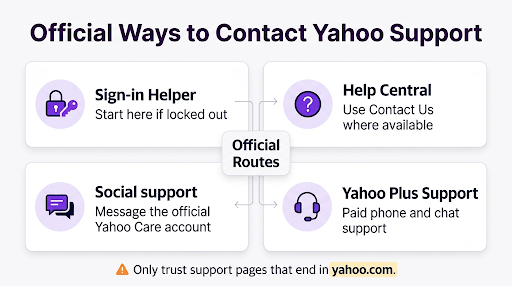
1. Yahoo Sign-in Helper (start here if you’re locked out)
The Yahoo Sign-in Helper is the main recovery tool. You enter your Yahoo email or phone number, and Yahoo sends a verification code to a recovery phone number or recovery email on file. Depending on your account, the code may come by text, email, or in some cases WhatsApp.
If none of the offered options work for you, look for the “I need more options” link. That path leads to more recovery steps and, eventually, to Yahoo’s help and contact pages.
2. Yahoo Help Central “Contact Us”
Yahoo’s own customer support help page says you should go to Help Central, choose the product you need help with, and click Contact Us where it’s available. The channel you get, such as email or chat, depends on your issue and your region. Yahoo also notes that not every product or issue has a contact option.
Here’s how to do it:
- Go to help.yahoo.com.
- Select Account (for sign-in and security issues) or Mail.
- Search for a topic such as “hacked account” or “sign-in problems.”
- Open the article and scroll to the bottom for Contact Us or a link to a Yahoo specialist.
- Follow the prompts and describe what happened clearly.
3. Social media: @YahooCare and Facebook
Yahoo Customer Care is active on X (@YahooCare) and Facebook. Send a direct message rather than a public post. Social teams usually can’t reset your password for you, but they can point you to the right recovery flow or escalate a stuck case.
Never share your password, verification codes, or full recovery details in a public reply. Real Yahoo staff won’t ask for your password.
4. Yahoo Plus Support (paid phone and chat)
Yahoo Plus Support is a paid subscription that gives you access to live agents by phone and chat. It’s the only official way to talk to a real Yahoo person on the phone. Consumer advocacy site Elliott.org lists Plus Support phone hours as Monday to Friday, 8 a.m. to midnight Eastern, and weekends 8 a.m. to 8 p.m. Eastern. Check the official subscription page inside your Yahoo account for the current number, price, and hours, since these can change.
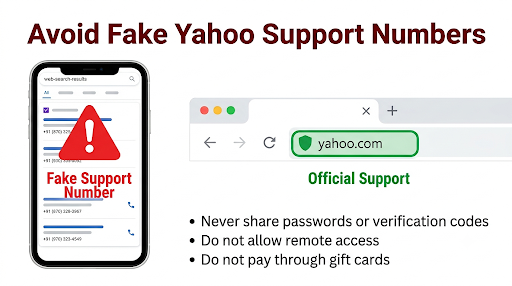
Important: If someone on the phone asks you to buy Plus Support through them, pay with gift cards, or install remote-access software, hang up. You subscribe to Plus Support only through yahoo.com.
Is There a Free Yahoo Customer Service Phone Number for Hacked Accounts?
No. Yahoo does not run a free public phone line for hacked or locked accounts. If you search “Yahoo customer service number 24/7,” you’ll find dozens of numbers on PDFs, forum posts, Google Sites pages, and random blogs. Those are not Yahoo.
The FTC warns that scammers use paid search results and copied brand names to look legitimate, and that you shouldn’t assume a phone number that shows up in search is real. These fake lines often try to:
- Charge you for “recovery” that Yahoo does for free
- Get remote access to your computer or phone
- Collect your password, codes, or card number
- Sell useless “security protection” plans
Here’s a simple rule: if a support page isn’t on a web address ending in yahoo.com, don’t trust its phone number. Yahoo’s own help page gives that same advice about checking the web address.
How Do You Know Your Yahoo Mail Account Was Hacked?
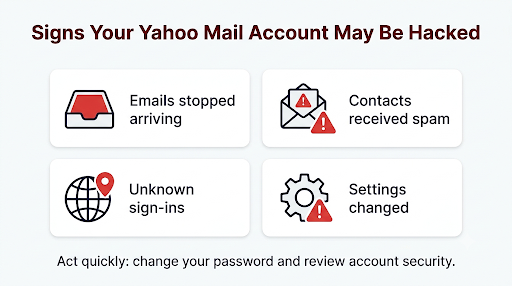
Yahoo lists four main warning signs in its guide to recognizing a hacked Yahoo Mail account:
- You stopped receiving emails.
- Your account is sending spam to your contacts.
- Your security page shows sign-ins from places you don’t recognize.
- Your account info or mail settings changed without you.
A common real-world example: a friend texts you asking why you sent them a strange link. That’s often the first sign. Another one is a sudden silence in your inbox, which can mean the hacker set up a filter or forwarding rule to hide or steal your mail.
What Should You Do Before You Contact Yahoo Support?
If you can still sign in, secure the account yourself first. It’s faster than waiting on support, and it stops the damage right away. Yahoo recommends these steps:
- Change your password immediately. Use a new password you haven’t used anywhere else.
- Delete app passwords you don’t recognize. Hackers sometimes create these to keep access even after you change your password.
- Check your recovery phone and email. Remove any number or address that isn’t yours.
- Sign out of unknown devices. Review recent activity and remove sessions and connected apps you don’t use.
- Turn on two-step verification. Yahoo supports passkeys, app push notifications, and SMS codes.
- Run an antivirus scan on your computer and phone.
Which Yahoo Mail settings do hackers change?
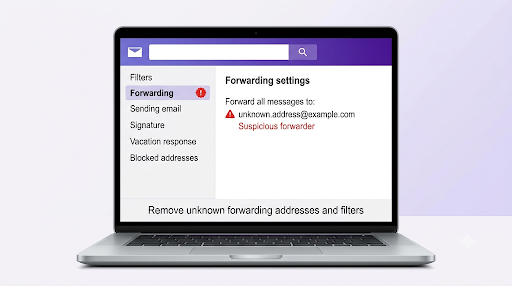
This is the step most people skip, and it’s why some accounts get hacked again. Open Yahoo Mail Settings and check every item below:
| Setting | What to look for |
| Filters | Rules that delete, hide, or move your mail |
| Auto-forwarding | Your mail being forwarded to an unknown address |
| Reply-to address | Replies going to someone else’s inbox |
| Sending name and default sending address | A changed “From” name or address |
| Send-only addresses | New addresses added without your permission |
| Signature | Added links or text you didn’t write |
| Vacation response | Automatic replies you didn’t set up |
| Blocked addresses | Real contacts blocked so you miss their warnings |
Tip: A hidden forwarding rule can quietly copy every password reset email you receive. Check forwarding first.
What If the Hacker Changed Your Password and Recovery Info?
Run the Sign-in Helper anyway. When someone changes your recovery options without permission, older recovery info can still show up and may still help you get back in. Try every option it offers before giving up.
If that fails, gather proof of ownership before you contact Yahoo. Support teams look for details only the real owner would know, such as:
- When you created the account (roughly)
- Old recovery phone numbers or email addresses
- Passwords you used in the past
- Devices and locations you usually sign in from
- Names of frequent contacts or folders
- When you last signed in successfully
Try recovery from a device and network you’ve used before, like your home Wi-Fi and usual laptop. Familiar signals can help Yahoo trust the request. Also, avoid hammering the login page with guesses. Too many failed attempts can lock you out temporarily.
Can You Recover a Hacked Yahoo Account Without a Phone Number?
Yes, but only if another valid recovery method exists, such as a recovery email. If both your recovery phone and email are gone, your options shrink fast. The Sign-in Helper and Help Central’s specialist path are your main free routes, and Plus Support is the paid one.
This isn’t unique to Yahoo. Microsoft handles lost recovery details with its own form, and if you also use Outlook, our guide on recovering a Hotmail account without your phone number walks through that process step by step.
What if your recovery email is also hacked?
This happens a lot when people reuse one password everywhere. If the hacker got into your Gmail recovery address too, recover that account first, because it receives Yahoo’s codes. Our guide on how to contact Google support for Gmail account recovery covers the official options there. Once your Gmail is safe, return to the Yahoo Sign-in Helper.
Who Do You Contact If Your Yahoo Mail Comes From AT&T, Verizon, or Another Provider?
Contact your internet provider first. Many people have Yahoo-powered email through partners such as AT&T, Verizon, Frontier, Rogers, Sky, or BT. These partner accounts often follow the provider’s password and recovery rules, not Yahoo’s standard ones.
Users on support forums often describe getting bounced back and forth between Yahoo and their provider. To avoid that, check your email address. If it ends in something like @att.net, @sbcglobal.net, @verizon.net, or @rogers.com, go to that provider’s support site first.
What Should You Do After You Get Your Account Back?
Getting back in is only half the job. Finish these steps the same day:
- Restore missing emails. Yahoo may be able to restore emails lost or deleted in the last 7 days through its restore request process. Act fast, because that window is short.
- Warn your contacts. Tell them to ignore any strange messages sent from your account during the hack.
- Change reused passwords. If you used your Yahoo password on other sites, change it there too, starting with banking and shopping.
- Check your financial accounts. Look for charges you don’t recognize, and consider a fraud alert on your credit report.
- Update your recovery info. Add a current phone number and a non-Yahoo recovery email.
- Use a password manager so each account has its own strong password.
Why is your account still sending spam after you changed the password?
It may not be your account at all. Yahoo explains that if you’ve secured your account and spam still seems to come from you, the cause is often spoofing. Spammers fake your address in the “From” line without ever getting into your inbox. Check your Sent folder. If the spam isn’t there, it’s likely spoofing.
Common Mistakes That Slow Down Yahoo Account Recovery
- Calling a number from search results. This is the biggest risk. It can turn a hacked email into stolen money.
- Paying a “recovery service.” Yahoo doesn’t charge for password resets or basic recovery.
- Changing only the password. Hidden forwarding rules and app passwords can keep the hacker connected.
- Waiting too long. The 7-day email restore window can close, and hackers can change more settings.
- Clicking links in “Yahoo security” emails or texts. Type login.yahoo.com directly into your browser instead.
- Letting an account sit unused. Yahoo may deactivate accounts after about 12 months without a sign-in.
Should You Report a Hacked Yahoo Account to Anyone Else?
If the hacker used your email to steal money or open accounts in your name, report it to the FTC at ReportFraud.ftc.gov. You should also report it if you called a fake support number and shared information. The FTC’s tech support scam guide says to change your password right away if you gave it to a scammer, and to change it anywhere else you used it too.
Frequently Asked Questions
Can I chat with Yahoo support live for free?
Sometimes. Yahoo may offer chat or email through Help Central’s Contact Us, depending on your issue and region. Guaranteed live chat and phone support come with the paid Yahoo Plus Support subscription.
How long does Yahoo take to respond to a hacked account request?
It varies. Sign-in Helper works in minutes if your recovery info is valid. Help Central requests and social media messages can take hours to days. Plus Support is usually the fastest way to reach a person.
Does Yahoo ever call you about a hacked account?
You shouldn’t expect an unsolicited call. If someone calls claiming to be Yahoo and asks for codes, your password, payment, or remote access, it’s a scam. Hang up and go to yahoo.com yourself.
Is there an official Yahoo support email address?
Yahoo doesn’t publish a general support email for account recovery. Any email-based help comes through the Contact Us forms on help.yahoo.com. Old addresses shared on blogs are not a reliable route.
Can Yahoo recover my account if I don’t remember my Yahoo ID?
Possibly. The Sign-in Helper can look up Yahoo IDs linked to a recovery phone number or email. If you don’t have either, try any old devices where you may still be signed in.
What happens if I can’t prove the account is mine?
Yahoo protects accounts by refusing access without enough proof. If every option fails, you may need to create a new account and update your email address on your important services. It’s frustrating, but it’s what keeps a hacker from doing the same trick.
Final Recommendation
If you can still sign in, change your password and clean up your mail settings right now, before you contact anyone. If you’re locked out, go straight to the Yahoo Sign-in Helper and try every recovery option, including older ones. Still stuck? Use Help Central’s Contact Us or message @YahooCare, and consider Yahoo Plus Support only if you need a person on the phone.
Whatever you do, only use help pages on yahoo.com. The real Yahoo support path is slower than a phone number on a random website, but it won’t cost you your money or your identity.