
You can’t call, email, or live chat with Google to recover a free personal Gmail account. Google handles Gmail recovery only through its automated Account Recovery page, and its own help center says that, for your security, you can’t call Google for help signing in. That sounds frustrating, but knowing it up front saves you from wasted hours and, more importantly, from fake “Google support” scammers.
Below, you’ll see the official recovery path, the few real ways to reach a human at Google (and when they apply), what to do if you lost your phone number or recovery email, and how to raise your chances of getting back in.
Quick Overview
| Your situation | Where to get help | Can you reach a human? |
| Free personal Gmail account | Google Account Recovery page (accounts.google.com/signin/recovery) | No. Recovery is automated only. |
| You added a recovery contact before getting locked out | Recovery page, then a code shared with your trusted contact | Your trusted friend or family member helps verify you |
| Paid Google One member | Google One support (chat, phone, or email) | Yes, but experts still work within Google’s verification rules |
| Work or school (Google Workspace) account | Your organization’s IT administrator | Yes, through your admin |
| Workspace super admin locked out | Admin “Forgot password” flow, then Google Workspace support | Yes, after domain ownership checks |
Bottom line: If someone offers you a “Gmail support phone number” or a paid recovery service, treat it as a scam.
Can You Call Google Support to Recover a Gmail Account?
No. Google does not offer phone, email, or live chat support for personal Gmail account recovery. Google’s help center states plainly that you can’t call Google for help signing in to your account and that it doesn’t work with any service that claims to offer account or password support.
This is a security decision, not a staffing gap. If a phone agent could reset accounts, hackers would simply call in and talk their way into your inbox. So Google relies on signals it can check automatically, like your devices, location, recovery phone, and recovery email.
What about the Google phone numbers you see online?
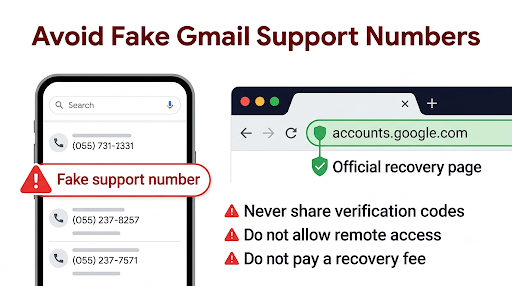
You’ll often find numbers like (650) 253-0000 listed on consumer sites. That’s Google’s main corporate line in Mountain View, not an account recovery desk. Nobody there can unlock your Gmail.
Other numbers that show up in ads, forums, or random “help” pages are often worse. Many lead to scammers who ask for your verification codes, remote access to your computer, or a “recovery fee.” Never share a Google verification code with anyone, even someone who says they work for Google.
How Do You Recover a Gmail Account the Official Way?
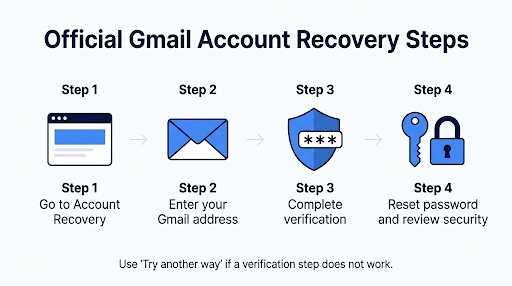
Use Google’s official Google Account recovery steps. The process takes a few minutes, and you can repeat it as many times as you need. Google says wrong guesses won’t kick you out and there’s no limit on recovery attempts.
- Go to the Account Recovery page at accounts.google.com/signin/recovery.
- Enter your Gmail address. If you forgot it, click “Forgot email?” and enter your recovery phone number or recovery email to find it.
- Answer each verification step. Google may send a code to your recovery phone or email, show a prompt on a signed-in phone, or ask for a password you used before.
- Click “Try another way” if a step doesn’t work for you. Google will offer a different challenge when one is available.
- Reset your password once Google confirms it’s you. Pick a strong password you haven’t used on this account before.
- Review your security settings right away. Check recent activity, signed-in devices, and your recovery options.
How Can You Improve Your Chances of Getting Your Account Back?
Give Google as many familiar signals as possible. Google’s own tips to complete account recovery steps point to the same pattern: the more your attempt looks like your normal sign-ins, the better.
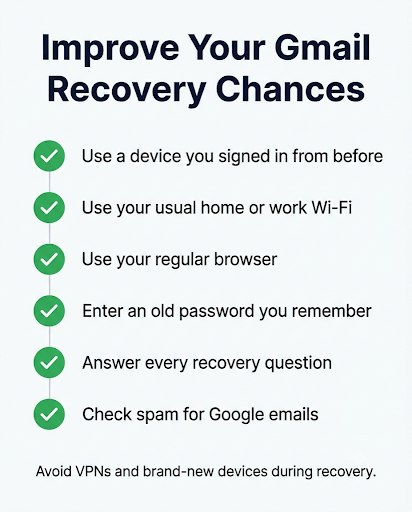
- Use a device you’ve signed in on before. A phone, tablet, or laptop that was logged in to Gmail carries strong trust signals.
- Use your usual location and Wi-Fi. Try from home or work instead of a hotel, coffee shop, or VPN.
- Use the same browser you normally use, like Chrome or Safari, rather than a new or private window on an unfamiliar device.
- Enter an old password if you don’t remember the latest one. The more recent it is, the better. If you truly can’t recall any, give your best guess.
- Answer every question. Skipping questions gives Google less to work with.
- Write a clear, specific explanation if Google asks why you can’t access your account, for example: “I lost my phone and changed my number in March.”
- Check your spam folder. Google may email you with the subject line “Your Google support inquiry.” Add noreply@google.com and accounts-support@google.com to your contacts so messages don’t get filtered.
Common mistakes that slow recovery down
- Trying from a brand-new phone or a borrowed computer first
- Using a VPN, which can make you look like you’re signing in from another country
- Retrying dozens of times in a few minutes instead of spacing attempts out
- Changing your recovery info right before trying again (Google says changes can take up to seven days to take effect)
- Paying a “recovery expert” who has no special access
What Are Google Recovery Contacts, and Can They Help You?
Yes, if you set one up before you got locked out. Google added recovery contacts in October 2025. A recovery contact is a trusted person with a Google Account who can help verify that you’re the real owner when you can’t sign in.
Here’s how it works, based on Google’s recovery contacts help page:
- You can add up to 10 recovery contacts.
- Your contact has up to 7 days to accept your invite, and there’s a waiting period before they can help.
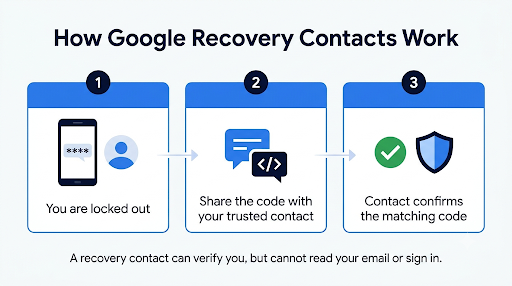
- When you’re locked out, Google shows you a code on the recovery page. You share it with your contact, and they confirm the matching code in their email or notification.
- Pick someone who can respond within about 15 minutes, because the code is time-limited.
- Your contact can’t read your email, see your files, or sign in to your account. Their only job is to vouch for you.
- Child accounts can’t add recovery contacts or act as one.
Real-world example: You drop your phone in a lake while traveling, and your SMS codes go nowhere. If your sister is your recovery contact, you start recovery on a laptop, text her the code from a friend’s phone, she taps the matching code, and you’re back in. Without that setup, you’d be stuck trying to prove ownership through older signals.
To add one, sign in to your Google Account, go to Security, then under “How you sign in to Google,” select Recovery contacts.
What If You Don’t Have Your Recovery Phone Number or Email?
You can still try, but your odds drop. Without a recovery phone or email, Google leans on other signals like your device history, location, past passwords, and when you created the account.
Try this order:
- Start recovery on a phone or computer where you’re still signed in to any Google app, such as YouTube, Google Photos, or Chrome. A signed-in device can often approve the sign-in with a prompt.
- If your old number was disconnected, contact your mobile carrier. In some cases, you can reclaim or port the number back and receive the code.
- Use “Try another way” on every screen until you see a challenge you can complete.
- If you have a recovery contact, use that option.
- Space out your attempts over a few days if Google says it couldn’t verify you.
If you’re dealing with the same problem on a Microsoft account, the approach is similar. This guide on recovering a Hotmail account without a phone number walks through Microsoft’s version of the process.
Is There Any Way to Talk to a Real Person at Google?
Yes, but only in specific situations. None of them gives you a back door around Google’s verification.
Google One members
If you pay for a Google One plan, you can contact Google experts by chat, phone, or email through Google One support. Only Google One members can use this. You usually need to be signed in to reach it, so it helps most when you’re still signed in on some device or when you need guidance rather than a direct unlock. Google won’t give access to an account it can’t confirm belongs to you, so don’t expect an agent to override the system.
Google Workspace users (work or school accounts)
If your Gmail address ends in your company or school domain, your IT administrator can reset your password. Contact them first. Google’s consumer recovery steps may not work for these accounts.
Workspace super administrators
If you’re the admin who’s locked out, start with “Forgot password” on the admin sign-in page. If no other admin can reset your password, Google Workspace support can help after you verify ownership of your domain. Signed-in admins can reach support from the Admin console by clicking “Get help” at the top right.
The Gmail Help Community
You can post in the Google Gmail or Google Account Help Community. Volunteer “Product Experts” answer there. They can’t access your account, but they’re good at reading unusual error messages and suggesting what to try next.
What Should You Do If Your Gmail Was Hacked?
Act fast and use the same recovery page. Google treats a hacked or hijacked account as a recovery case, and the steps work even if someone changed your password.
- Start recovery right away from a familiar device. The sooner you act, the more of your original sign-in signals still apply.
- Look for Google security emails in your recovery email inbox. Alerts about a password change often include a link to secure your account.
- After you’re back in, run the Google Security Checkup, sign out unknown devices, remove forwarding rules or filters you didn’t create, and turn on 2-Step Verification or a passkey.
- Warn your contacts from another account or by text, since hackers often send scam messages from hijacked inboxes.
- Update other accounts that use the same password or rely on this Gmail for password resets.
Hacked accounts are tricky on every platform. If you also use Yahoo, here’s how to contact Yahoo Mail support about a hacked account and what help Yahoo actually offers.
What If You Deleted Your Gmail or Google Account?
You may be able to restore it if you act soon. Google lets you recover a recently deleted account through the same recovery flow. After enough time passes, the account and its data are permanently deleted and can’t be brought back. If you see a message that the account is gone for good, recovery isn’t possible.
What If Google Still Can’t Verify It’s You?
You can keep trying, but you may eventually need a new account. If you see “Google couldn’t verify this account belongs to you,” Google says you can try again. Wait a few days, use your most familiar device and location, and answer every question carefully.
If nothing works, Google’s advice is to create a replacement Google Account. Keep these facts in mind:
- Your old address won’t be reissued. Gmail usernames aren’t recycled, so you’ll need a variation, like adding a number.
- A lost account can’t be closed unless the owner signs in.
- Subscriptions may keep billing. If you paid for Google One, YouTube Premium, or other services, contact your bank or card issuer about stopping those charges if you can’t sign in to cancel.
- Update your important accounts (banking, shopping, social media) with your new email.
How Do You Avoid Getting Locked Out Again?
Set up backup sign-in options now, while you still have access. Ten minutes today can save you weeks of stress later.
| Backup option | Why it matters |
| Recovery phone number | Receives codes and helps block someone from using your account without permission |
| Recovery email | Gets reset links and security alerts, and helps confirm your username |
| Recovery contacts | A trusted person can vouch for you when other methods fail |
| Passkey | Lets you sign in with your fingerprint, face, or screen lock instead of a password |
| Backup codes | One-time codes you can print and store safely for 2-Step Verification |
| Google Takeout export | A regular copy of your email, photos, and files in case you ever lose the account |
One more tip: don’t use a Google Voice number as your recovery phone. Google warns that if you’re locked out, you can’t receive a code sent to a Google Voice number tied to that same account.
Frequently Asked Questions
Is there a Gmail customer service number that’s open 24/7?
No. There’s no 24/7 Gmail customer service phone number for personal accounts. Any site or ad promising round-the-clock Gmail phone support is not Google, and calling it puts your account and money at risk.
How long does Gmail account recovery take?
It can take a few minutes if you pass verification right away. When Google needs more time to confirm your identity, it may delay the request and contact you later by email, sometimes after several days. If you recently updated your recovery info, those changes can take up to seven days to count.
Can Google support recover my account using my ID or a photo of my face?
No, not for personal Gmail. Google doesn’t accept ID uploads or selfies to verify free accounts through a support agent. Verification happens through the automated recovery questions and signals.
Does paying for Google One guarantee I’ll get my Gmail back?
No. Google One gives you access to Google experts by chat, phone, or email, which can be useful for guidance. But it doesn’t change the rule that Google must confirm you’re the owner before restoring access.
Can I recover my Gmail account through Reddit or social media?
You can get advice there, but nobody on Reddit, X, or Facebook can unlock your account. Be extra careful with direct messages from “recovery experts.” Real Google staff won’t DM you asking for codes or payment.
What if I’m locked out because of 2-Step Verification on a lost phone?
Try a backup code, a security key, or a prompt on another signed-in device first. If you have none of these, start the recovery flow and choose “Try another way.” A recovery contact can also help if you added one beforehand.
Final Recommendation
Skip the search for a Gmail support phone number. It doesn’t exist for personal accounts, and the numbers you find are a common scam route. Go straight to accounts.google.com/signin/recovery, use a device and location you’ve signed in from before, and answer every question as completely as you can.
If you use a work or school account, contact your IT admin. If you pay for Google One, reach out to their experts for guidance. And once you’re back in, add a recovery phone, recovery email, and at least one recovery contact so you never have to go through this again.