
You can recover a Hotmail account without a phone number. If you have no access to the old number, the main route is the Microsoft account recovery form at account.live.com/acsr. You fill it in with details only the real owner would know, and Microsoft replies to a working email address you provide. If you still have a recovery email, a 25-character recovery code, or the Microsoft Authenticator app, you may not need the form at all.
This guide walks you through every option, from the quickest fix to the last-resort steps. It also covers what to do when the form keeps failing, when two-step verification blocks you, and when an old Hotmail address may already be gone for good.
Quick Overview
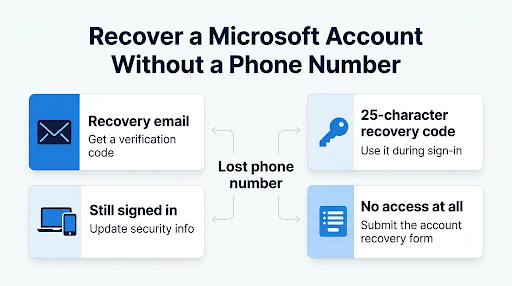
| Your situation | Best way to get back in |
| You still have access to your recovery email | Reset your password at account.live.com/password/reset and pick the email option for the code |
| You saved a 25-character recovery code | Choose “I don’t have any of these” during sign-in and enter the code |
| You use the Microsoft Authenticator app | Approve the sign-in or use the app code instead of a text message |
| You’re still signed in on a phone, PC, or Xbox | Update your security info from that signed-in device |
| You have no phone, no recovery email, and no code | Submit the account recovery form at account.live.com/acsr |
| Two-step verification is on and you have no backup method | Look for your recovery code. Without it, Microsoft says it can’t help |
Why Does Microsoft Keep Asking for an Old Phone Number?
Microsoft asks for the phone number because it’s part of your account’s “security info.” When you try to reset a password, Microsoft sends a code to the phone or email saved on the account. If that number is disconnected, the code goes nowhere.
Hotmail, Outlook.com, Live.com, and MSN.com addresses are all Microsoft accounts. So the recovery steps below work the same for every one of them. They also unlock any linked services, like OneDrive, Skype, Xbox, and Microsoft 365.
Here’s the part many guides skip: Microsoft support agents can’t reset your password for you. Even if you reach a person by chat, they will point you back to the recovery form. It’s built that way on purpose, so a scammer can’t talk their way into your inbox.
Step 1: Does Your Hotmail Account Still Exist?
Before you spend an hour on recovery, confirm the account is still active. Microsoft closes accounts that haven’t been used for a long time.
According to Microsoft’s Microsoft account activity policy, you need to sign in at least once every two years to keep a Microsoft account active. Outlook.com inboxes and OneDrive storage are frozen after one year of inactivity, and their content can be deleted shortly after that.
To check, go to outlook.live.com and enter your Hotmail address.
- If you see a password screen, the account exists. Keep reading.
- If you see “That Microsoft account doesn’t exist,” check the spelling first. Typos like “hotmial” or “hatmail” are common. If the spelling is right, the account may have been closed.
Important: If an account was closed for inactivity more than two years ago, it can’t be restored, even by Microsoft support. If you closed it yourself, you may still be able to reopen it within the 30 or 60 day grace period you picked when closing it.
Step 2: Can You Use a Recovery Email Instead of a Phone?
Yes, and it’s the fastest fix. Many people forget they added a backup email years ago.
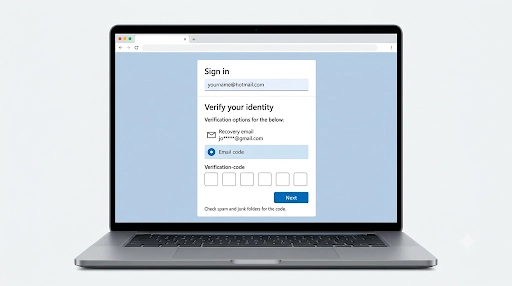
- Go to account.live.com/password/reset.
- Enter your Hotmail address and select Next.
- Look at the list of verification options. Microsoft shows partial hints, like “Email jo*****@gmail.com.”
- If you recognize an email, select it, type the full address, and select Get code.
- Enter the code from that inbox and create a new password.
Tip: Check the spam and junk folders of the recovery inbox. Codes from Microsoft often land there.
Don’t recognize any of the hints? Microsoft’s Sign-in Helper tool can check whether you’re entering the right username and point you to the correct next step. You can find it on the Microsoft Support site by searching “Microsoft account sign-in helper.”
Step 3: Do You Have a 25-Character Recovery Code?
A recovery code is a 25-character code (it looks like a product key) that Microsoft gives you when you turn on two-step verification or create one manually. It works even if you’ve lost your phone and your recovery email.
To use it:
- Start signing in with your Hotmail address.
- Select Use a different verification option, then I don’t have any of these.
- At the “Do you have an account recovery code?” prompt, enter the code.
- Set a new password when prompted.
Search old notes, printed documents, password managers, and screenshots for it. Microsoft explains the process on its Microsoft account recovery code help page.
Good to know: You can’t download or look up an old recovery code. Once you’re back in, generate a new one and store it somewhere safe that isn’t the same device you sign in with. If two-step verification is on, security changes made with a recovery code take 30 days to take effect.
Step 4: Are You Still Signed In Somewhere?
Check every device before you assume you’re fully locked out. You may still be signed in to:
- The Outlook app on your phone or tablet
- A Windows PC that uses your Microsoft account
- An Xbox console
- A browser where you checked “Stay signed in”
- The Microsoft Authenticator app
If you are, go to account.microsoft.com, open Security, and add a new phone number or email under your sign-in methods. If Microsoft lets you approve the change through the Authenticator app or a recovery email, the update can happen right away.
Watch out for the 30-day wait. If you remove or replace all your old security info and can’t verify with any of it, Microsoft puts the account in a restricted state for 30 days. You can usually keep using email during that time, but you can’t make further security changes. Support can’t shorten this period. It exists so the real owner gets alerts if a hacker is behind the change.
Step 5: How Do You Fill Out the Microsoft Account Recovery Form?
If none of the options above work, the recovery form is your path back in. It asks questions that only the account owner could answer, then compares your answers to the account’s history.
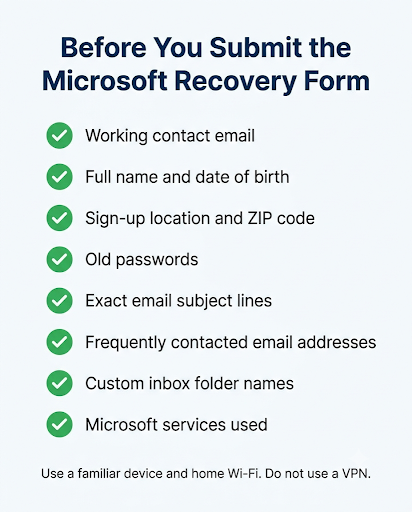
Before you start, get these ready
- A working email address that’s different from the locked Hotmail account. A free Gmail or new Outlook.com address works. Microsoft only uses it to contact you about this request.
- Your full name and date of birth as you entered them when creating the account.
- Location details from sign-up: country, state, city, and ZIP code.
- Old passwords. List every one you remember, even partial ones. Older passwords still count.
- Recent email subject lines you sent. Exact wording helps the most.
- Email addresses you contacted recently. Microsoft lets you add several.
- Folder names you created in your inbox.
- Other Microsoft services you used with the account, like Skype contacts, Xbox gamertag, or Microsoft Store purchases.
Tip: Ask friends or family to search their inbox for emails from your Hotmail address. They can give you exact subject lines and dates, which are some of the most useful details on the form.
How to submit the form
- Use a device and network you’ve used before to sign in, such as your home computer on your home Wi-Fi. Microsoft treats familiar devices and locations as a trust signal.
- Go to account.live.com/acsr.
- Enter the Hotmail address you’re trying to recover.
- Enter your working contact email.
- Type the characters shown on screen and select Next.
- Enter the verification code sent to your contact email.
- Answer every question. Use the “add more” options for passwords, contacts, and subject lines.
- Submit the form and watch your contact email, including the spam folder.
Microsoft’s guide to the Microsoft account recovery form says it reviews submissions and replies within 24 hours. Some users report waiting longer, so give it up to 72 hours before you assume something went wrong.
What happens next
- If Microsoft verifies you, you’ll get an email with steps to reset your password and sign back in.
- If it can’t verify you, you can try again up to two times per day.
What Should You Do If the Recovery Form Keeps Failing?
A rejection doesn’t mean the account is lost. It means Microsoft didn’t get enough matching information. Submitting the same answers again won’t change the result. Add better details instead.
Here’s how to improve your next attempt:
- Dig deeper for old passwords. Check saved passwords in Chrome, Edge, Safari, or the iPhone Keychain. An old saved password for live.com or login.live.com is gold.
- Get exact subject lines. “Re: Thanksgiving plans” beats “something about Thanksgiving.”
- Add more contacts. List full email addresses, not just names.
- Switch to a familiar device. If you filled the form on a work laptop, try again on your personal phone or home PC.
- Don’t use a VPN. It can make your location look unfamiliar.
- Be accurate, not creative. Leave a field blank rather than guessing wildly.
Microsoft also has an “Account recovery unsuccessful” support page with a short video on filling out the form. It’s worth watching before your next try.
Can You Recover Hotmail If Two-Step Verification Is On?
Only if you still have one working verification method or your recovery code. This is the hardest situation to fix.
When two-step verification is turned on, Microsoft needs two separate proofs of identity. If you lost both your phone and your other methods, Microsoft’s own guidance says it can’t help, and the recovery form won’t work either. No one at Microsoft can bypass two-step verification for you.
Your options in this case:
- Search everywhere for the 25-character recovery code.
- Check whether the Microsoft Authenticator app is still installed on an old phone or tablet.
- Check for a passkey or Windows Hello sign-in on a PC you used before.
- Try a recovery email you may have forgotten about.
If none of these exist, the realistic next step is to create a new Microsoft account and update your email address with banks, social media, and other services.
What If Your Hotmail Account Was Hacked?
If someone changed your password, phone number, or recovery email, act fast. Use the same recovery form at account.live.com/acsr, and fill it out as soon as possible from a familiar device.
Check your old recovery email or phone for Microsoft alerts like “Security info change requested.” Those messages often include a link to cancel the hacker’s change during the 30-day waiting period.
Once you’re back in:
- Change your password to one you’ve never used before.
- Remove any phone numbers, emails, or devices you don’t recognize.
- Check inbox rules and forwarding settings in Outlook.com. Hackers often add them quietly.
- Review recent sign-in activity on the Security page.
- Turn on two-step verification and save a new recovery code.
Hacks rarely stop at one inbox. If the attacker had access to other email accounts, see our guide on getting help from Yahoo Mail support for a hacked account.
Can You Recover an Old Hotmail Account You Haven’t Used in Years?
It depends on whether the account is still active. If you haven’t signed in for over two years, it was likely closed and deleted under Microsoft’s activity policy. In that case, there’s nothing to recover.
If the account still shows a password screen, it’s worth trying. Older accounts are harder, though, because you may not remember recent emails. Focus on these details for the form:
- Passwords you used back then, even several old ones
- Your name and birth date exactly as you entered them at sign-up
- The city and ZIP code where you lived when you created it
- Old MSN Messenger or Skype contacts
One more thing: if an old Hotmail address was deleted, you can’t create it again. Microsoft doesn’t let anyone re-register closed Hotmail addresses for security reasons.
Can You Recover Someone Else’s Hotmail Account, Like a Parent’s?
Only if that person helps you complete the steps. The recovery form asks for details only the owner would know, so the account owner should be present to answer the questions.
Microsoft doesn’t hand over access to someone else’s account, even for family. If the account owner has passed away, Microsoft has a separate process for closing the account or requesting data, which may require legal documents.
Common Mistakes That Slow Down Hotmail Recovery
- Using the locked account as your contact email. Microsoft can’t reach you there.
- Filling out the form on a brand-new device. Use the phone or computer you normally used for Hotmail.
- Resubmitting the same answers. Add new information each time.
- Paying a “recovery service.” Microsoft’s recovery is free. Anyone charging you to unlock Hotmail is a scam.
- Calling numbers from search ads. Fake “Hotmail support” phone lines are common. Use only official Microsoft pages.
- Giving up after one rejection. Many people succeed on the second or third attempt with better details.
How Do You Make Sure This Never Happens Again?
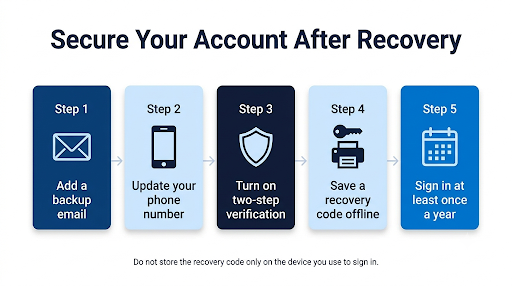
Once you’re back in, spend five minutes on your security settings. It can save you weeks of stress later.
- Add a backup email that you actually check, like a Gmail account.
- Update your phone number whenever you change carriers or numbers.
- Install Microsoft Authenticator so you don’t rely only on text codes.
- Generate a recovery code and print it or store it in a password manager.
- Sign in at least once a year to keep your Outlook.com inbox active.
The same habits protect other inboxes too. If you also use Gmail, here’s how to contact Google support about Gmail account recovery if you ever get locked out there.
Frequently Asked Questions
Is there a phone number to call Microsoft for Hotmail recovery?
No, there isn’t a phone line that can reset your Hotmail password. You can start a chat through the Microsoft Support “Contact us” page, but agents aren’t allowed to send password reset links or change account details. They will direct you to the recovery form.
Can I recover my Hotmail account without a phone number and without a recovery email?
Yes, as long as two-step verification wasn’t turned on. Use the recovery form at account.live.com/acsr and give it any working email address for replies, even a new one you create today.
How long does Hotmail account recovery take?
Microsoft says it reviews recovery form submissions within 24 hours, though some replies take up to 72 hours. If you replace your security info, add another 30 days before the change is final.
Can I use a friend’s email address on the recovery form?
You can, because Microsoft only uses it to send you updates about the request. A better option is to create a new free email account you control, so you don’t miss any codes or messages.
I forgot my Hotmail email address. How do I find it?
Go to account.live.com/username/recover and enter a recovery email or phone that might be linked to the account. You can also search old emails sent to friends, or check saved accounts in your browser, phone, or Xbox.
Does a new phone number work if the old one is gone?
Not for verification. Microsoft can only send codes to the number already on the account. You can add a new number after you get back in, or during recovery, but replacing all security info triggers the 30-day waiting period.
Final Recommendation
Start with the easiest check: try the password reset page and see if you recognize a backup email. If not, look for a saved recovery code or a device that’s still signed in. When all of those fail, take your time with the account recovery form. Fill it out from your usual device and home network, and include every old password and exact subject line you can find.
If the first attempt is rejected, gather more details and try again the next day. And once you’re back in, add a backup email, set up Microsoft Authenticator, and save a recovery code so a lost phone number never locks you out again.