
Facebook has no customer service phone number and no general support email for hacked personal accounts. The official way to contact Facebook support about a hacked account is the Report Compromised Account page at facebook.com/hacked. Open it on a phone or computer you’ve used to log in before. If you can still get into the app, the Meta AI support assistant and the in-app Support hub are your other official options. Meta Verified subscribers also get chat with a human agent.
The problem is that hacked users are panicked and search for a person to talk to, and scammers know it. This guide covers every real contact channel, which one fits your situation, what to do when the hacker changed your email and phone number, and how to spot fake “Facebook support” before it costs you money.
Quick Overview
| Your situation | Best official way to contact Facebook |
| Locked out, password changed | Go to facebook.com/hacked on a device you’ve used before and choose “My account is compromised” |
| Hacker changed your email | Find Facebook’s “email changed” message in your old inbox and use the link in it to reverse the change |
| Hacker changed your email and phone | Use facebook.com/hacked or facebook.com/login/identify, tap “No longer have access to these?”, then verify with ID or a selfie video |
| You can still log in | Use the Meta AI support assistant or Settings > Help & Support to report the problem and reset your password |
| You want a human agent | Meta Verified subscribers get chat support (paid plan, results not guaranteed) |
| A Page, ad account, or business portfolio was hacked | Meta Business Help Center > Get Support, or the Facebook Page recovery form |
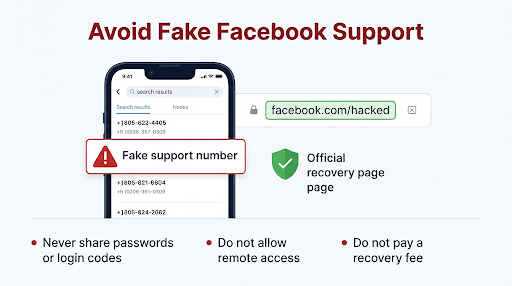
Never call a “Facebook support” phone number you find in search results, ads, comments, or DMs. Facebook does not offer phone support for account recovery.
Can You Actually Contact Facebook Support Directly?
Yes, but not by phone and not by email. Facebook support for personal accounts is self-service and runs through official tools: the hacked-account page, the in-app Support hub, the Meta AI support assistant, and paid chat through Meta Verified.
That changed a little recently. In December 2025, Meta launched a centralized support hub for Facebook and Instagram. In March 2026, Meta expanded its AI support assistant to the Facebook and Instagram apps on iOS and Android and to the desktop Help Center, in countries where Meta AI is available. Meta says the assistant can reset passwords, report scams and impersonation accounts, track appeals, and update profile and privacy settings within Facebook.
Meta also says the relative success rate of hacked account recovery rose by more than 30% in the U.S. and Canada after it added AI-based recovery features. That’s a meaningful improvement. Still, recovery isn’t guaranteed. It depends on how much the hacker changed and how well you can prove the account is yours.
Every Contact Option, Compared
| Channel | Cost | Works if you’re locked out? | Human involved? |
| facebook.com/hacked | Free | Yes | Mostly automated |
| facebook.com/login/identify | Free | Yes | Automated, with ID review |
| Meta AI support assistant | Free | Mostly no (login help is being tested in select U.S. and Canada cases) | No, AI |
| Support hub (Help & Support in the app) | Free | No | Mostly automated |
| Meta Verified chat or email support | Paid monthly plan | Only on an account you can log in to | Yes |
| Meta Business Help Center | Free for advertisers and business admins | Only if you or a co-admin still has access | Yes, chat in many cases |
| Phone numbers and “support@” emails online | Often a scam | No | Not Meta |
How Do You Report a Hacked Facebook Account Using facebook.com/hacked?
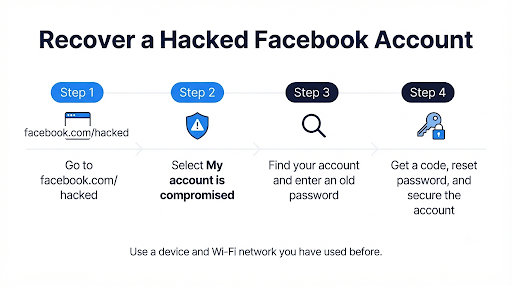
Go to facebook.com/hacked, choose that your account is compromised, find your account, and follow the prompts. Start on the phone, tablet, or computer you normally use for Facebook. This step matters more than most people realize. Meta’s recovery systems check for devices and locations you’ve used before. A familiar device on your home Wi-Fi gives you a much better shot than a brand-new phone at a coffee shop.
- Open Facebook’s Report Compromised Account page in a browser you’ve used for Facebook before.
- Select “My account is compromised.”
- Find your account. Enter the email address or phone number that was on the account, or search by your full name.
- Enter a password. Use your current password or an older one. Facebook can accept an old password as proof that you’re the owner.
- Pick where to get your code. If any of your original contact details are still on the account, Facebook sends a reset code there.
- Follow the security steps. Facebook will usually have you set a new password, review recent changes, and remove anything the hacker added.
Common mistake: trying the reset over and over from different devices and networks. Each failed attempt from an unfamiliar device can make your activity look less like the real owner’s. Pick your most trusted device and stick with it.
What If the Hacker Changed Your Email Address?
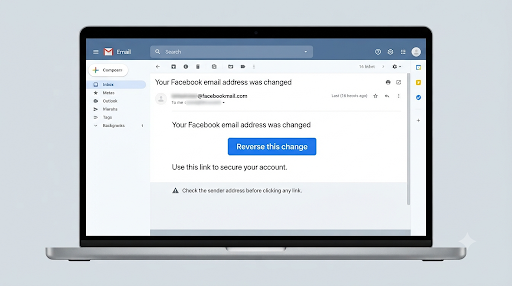
Check your old email inbox first. When the email on a Facebook account changes, Meta sends a message to the previous address with a special link that reverses the change and secures the account. This is often the fastest way back in.
- Search your inbox, spam, and trash for “Facebook,” “email changed,” or “security.”
- Real security emails usually come from addresses ending in @facebookmail.com.
- Hover over the link before you tap it. A real link goes to facebook.com, not a lookalike domain.
- If your email account was also hacked, secure your email first. Change that password and turn on two-step verification. Otherwise the hacker can just undo your fix.
Act quickly. The hacker may delete that email if they’re also inside your inbox, and some reversal links don’t work forever.
What Should You Do If the Hacker Changed Your Email and Phone Number?
Use the “No longer have access to these?” option and verify your identity. This is the toughest situation, but it’s still recoverable in many cases.
- Go to facebook.com/hacked or facebook.com/login/identify on a trusted device.
- Search for your account using an old email, an old phone number, your username, or your name.
- When Facebook offers to send a code to contact details you don’t recognize, tap “No longer have access to these?”
- Enter a new email address or phone number that you control. Use one that has never been linked to any Facebook account.
- Complete identity verification. Depending on your account, Facebook may ask for a photo of a government-issued ID or an optional selfie video, which Meta added to its recovery process in late 2025.
- Watch the new email or phone for updates. Reviews can take anywhere from a few hours to several days.
Tips That Raise Your Chances
- Match your ID to your profile. The name on your ID should match the name on your Facebook profile as closely as possible.
- Take clear photos. Use good light, show all four corners of the ID, and avoid glare.
- Record the selfie video in a well-lit room with your face fully visible. No hats, sunglasses, or filters.
- Submit once and wait. Sending several requests can slow things down.
What If the Hacker Turned On Two-Factor Authentication?
This is a common trick. The hacker adds their own phone or authenticator app, so you can’t get past the login code even with your password. Go through facebook.com/hacked anyway. If Facebook recognizes your device, it may offer other ways to confirm your identity, including ID upload or a selfie video. If those options don’t show up, try again later from the device and network you’ve used most often.
How Do You Contact Facebook Support If You Can Still Log In?
Use the Meta AI support assistant or the in-app Support hub. If a hacker is posting from your account or you see logins you don’t recognize but you’re not locked out yet, you can move fast.
- Open the Facebook app and tap the menu.
- Go to Help & Support (the name can vary a little by app version).
- Open the support hub or the Meta AI support assistant and describe the problem, for example “someone else is logged into my account.”
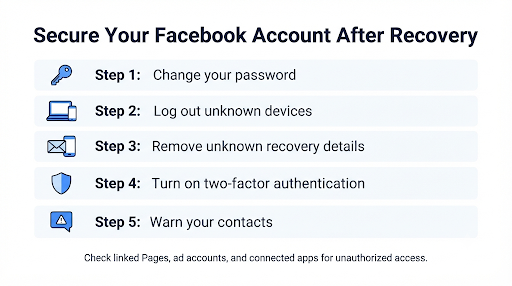
- Change your password right away in Accounts Center under Password and security.
- Check Where you’re logged in and log out of every device you don’t recognize.
- Check your email, phone number, and two-factor settings. Remove anything the hacker added.
- Run Security Checkup, which Meta redesigned to help you spot and fix risks.
Also check Business settings, Pages, and linked apps. Hackers often add themselves as a Page admin or link the account to an ad account so they keep access after you change your password.
Does Paying for Meta Verified Get You Real Human Support?
It can, but it’s not a sure fix. Meta Verified is a paid subscription with ID verification, a badge, impersonation protection, and access to account support from a human agent by chat or email. Many users on Reddit and in local news reports say a Verified chat agent restored their hacked account within a day or two after months of getting nowhere.
Others had the opposite experience. An ABC7 News investigation followed a man who paid for several months of Meta Verified and had nearly two dozen chats, but still couldn’t get his account back.
Know these limits before you pay:
- You need an account you can log in to. You can’t subscribe from the hacked account if you’re locked out. Some users subscribe on a different Facebook or Instagram account they still control and ask the agent about the hacked one. Agents may or may not be able to help with an account they can’t verify.
- Pricing varies. As of late 2026, the Standard plan is listed at $14.99 a month in the U.S. when you subscribe in the app. Signing up on the web may cost less. Check the price at checkout, since Meta now offers several tiers.
- It renews automatically. Cancel once your issue is resolved if you don’t want the subscription.
Fair verdict: if the free tools have failed and the account matters to you (years of photos, a business, Marketplace history), one month of Meta Verified is a reasonable gamble. Just don’t expect a guarantee.
How Do You Get Help for a Hacked Facebook Page or Business Account?
Business accounts have better support options than personal profiles. If a hacker took over a Page, ad account, or Meta business portfolio:
- If you or a co-admin still has access: go to the Meta Business Help Center and select Get Support in the upper-right corner. Advertisers can often chat with a representative there.
- If you lost access to a Page: submit the Facebook Page recovery form in the Help Center. Facebook says it aims to reply by email within about a day, though some reviews take longer.
- If your personal profile was the way in: recover the personal account first through facebook.com/hacked. Page and business access usually follows the profile.
- Check for unauthorized ad spend and tell your bank or card issuer about any charges you didn’t make.
Are Facebook Support Phone Numbers and Emails Real?
No phone number reaches Facebook account support, and the support emails passed around online won’t recover a hacked personal account. This is the biggest content gap in most articles on this topic, and the most dangerous one.
Fake Phone Numbers
Search results, Reddit threads, Quora answers, and even PDF files on unrelated sites are full of “toll-free Facebook helpline” numbers. They’re scams. Callers are often asked to install remote-access apps like AnyDesk, pay a “recovery fee,” or buy gift cards. In one case reported by Fox News, a victim who called a fake Facebook number had a scammer remote into her phone and claim to find a $17,000 crypto purchase. Facebook has said it does not offer phone tech support.
Old Support Email Addresses
You’ll see addresses like support@fb.com or disabled@fb.com listed on older blogs. Meta doesn’t offer these as channels for recovering personal accounts. Other addresses, like press@fb.com or records@fb.com, are for journalists and law enforcement. Emailing them won’t get your account back.
Red Flags of a Fake “Facebook Support” Contact
- They contacted you first, through a comment, DM, text, or call.
- They ask for your password, login codes, or a recovery code sent to your phone.
- They want payment by gift card, crypto, Zelle, Cash App, or wire transfer.
- They want you to install a screen-sharing or remote-access app.
- They promise “guaranteed” recovery in minutes.
- The profile is called something like “Meta Support Team” with a blue check in its profile picture.
Rule of thumb: real Meta recovery only happens inside facebook.com, the Facebook app, or meta.com. Meta does not charge for recovery outside its own Meta Verified subscription. Anyone else asking for money is not Meta.
What Should You Do Right After Your Facebook Account Is Hacked?
Report it, lock down your email, and warn your contacts. Hacked accounts are often used to scam friends and family within hours, usually with fake investment, crypto, giveaway, or “I need help” messages.
- Start recovery at facebook.com/hacked right away.
- Secure the email account linked to Facebook. Change its password and turn on two-step verification.
- Warn people by text, on Instagram, or on another platform. Ask them to ignore money requests and links from your Facebook account.
- Ask friends to report the account as hacked from your profile menu. Reports from friends can help flag it.
- Check linked accounts. If your Instagram is connected through Accounts Center, change its password too. The same applies to apps and sites where you log in with Facebook.
- Watch your money. If payment details were saved in Facebook Pay, Meta Pay, or an ad account, contact your bank.
- Report identity theft if personal data was misused. The FTC’s guide on how to recover a hacked email or social media account points victims to IdentityTheft.gov for a personalized recovery plan.
If you also manage Instagram and run into a different issue there, such as a disabled account instead of a hacked one, the process isn’t the same. This guide on how to contact Instagram support about a disabled account walks through that appeal process step by step.
Why Does Facebook Keep Rejecting Your Recovery Attempt?
Usually because the system can’t connect you to the account with enough confidence. Here are the most common causes and fixes.
| Problem | Likely cause | What to try |
| “We couldn’t confirm your identity” | Unfamiliar device or location | Retry from your usual phone or computer on your home network |
| ID rejected | Blurry photo or name doesn’t match the profile | Retake in good light; use the ID whose name best matches your profile |
| Codes go to the hacker | Hacker replaced your email, phone, or 2FA | Choose “No longer have access to these?” and verify with ID or selfie video |
| Stuck in a loop | Too many requests in a short time | Wait 24 to 48 hours, then try once from a trusted device |
| Account disabled after the hack | Hacker’s activity broke Community Standards | Appeal the disabled account; explain it was hacked |
| Account deleted | Hacker requested deletion | Act fast; Facebook allows a short window to cancel deletion before it’s permanent |
How Can You Keep Your Facebook Account From Being Hacked Again?
Lock down login access so a stolen password alone isn’t enough.
- Use a passkey or two-factor authentication. Meta supports passkeys on Facebook and Messenger, so you can sign in with your fingerprint, face, or device PIN. An authenticator app is safer than text codes.
- Use a unique password that you don’t use anywhere else. A password manager helps.
- Turn on login alerts so you hear about new devices right away.
- Keep your recovery email and phone current. An old college email you can’t access is a recovery dead end.
- Save your recovery codes somewhere offline.
- Be suspicious of “copyright violation,” “your Page will be disabled,” and “is this you in this video?” messages. These are the most common phishing hooks on Facebook.
- Run Security Checkup every few months.
Frequently Asked Questions
Is there a 24-hour Facebook customer service number?
No. Meta doesn’t run a phone line for Facebook account support, 24-hour or otherwise. Any number claiming to be a Facebook helpline is not run by Meta. Meta Verified’s higher business tiers include call-back support, but you request that from inside the account, not by dialing a number.
How long does it take to recover a hacked Facebook account?
It can take minutes or weeks. Reversing an email change through the link in your old inbox can work almost instantly. ID or selfie video reviews often take one to several days, and harder cases can drag on longer. Avoid sending new requests while one is under review.
Can I contact Facebook through Instagram if my Facebook was hacked?
Sometimes. If you have Meta Verified on Instagram, you can open a support chat there and explain that your Facebook account was hacked. Some users say this worked for them. It isn’t an official cross-platform recovery path, though, so results vary.
Will Facebook tell my friends my account was hacked?
No. Facebook won’t alert your friends for you. You need to warn them yourself through texts, other social apps, or a post once you’re back in. That’s important because hackers often message your friends asking for money or sending scam links.
Can a hacked Facebook account be recovered without ID?
Yes, if you still control the original email or phone number, or if you can use the reversal link in your old inbox. ID or a selfie video is usually needed only when the hacker replaced every contact method on the account.
Should I file a police report for a hacked Facebook account?
It’s worth doing if money was stolen, someone is impersonating you to commit fraud, or you’re being threatened or extorted. A police report won’t unlock the account on its own, but it documents the crime for your bank, the FTC, or a later dispute. Some state attorney general offices also take complaints about account takeovers.
Final Recommendation
Start with the free official route, and start it on the right device. Open facebook.com/hacked on the phone or computer you’ve used most for Facebook, and check your old inbox for the email-change reversal link at the same time. If the hacker replaced all your contact details, use “No longer have access to these?” and complete ID or selfie video verification once, carefully.
If you can still log in, use the Meta AI support assistant and change your password right away. If the free tools fail and the account really matters, one month of Meta Verified gives you the only human chat option for personal accounts. And whatever happens, don’t call phone numbers or trust “recovery experts” you find online. Recovering from a hack is stressful enough without getting scammed a second time.