
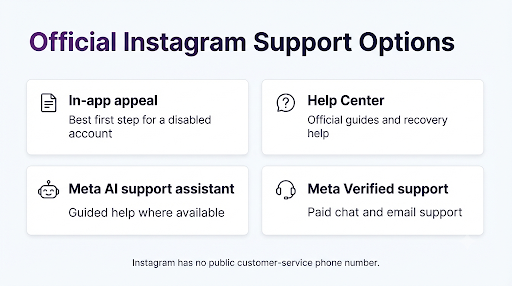
To contact Instagram support about a disabled account, try to log in to the account and follow the on-screen prompt to request a review or appeal the decision. Instagram has no customer service phone number or public email for standard account recovery. Official help comes through the app’s appeal flow, the Instagram Help Center, the Meta AI support assistant and, for paying subscribers, Meta Verified chat and email support.
This guide shows you where each official option is, what to say in your appeal, how to keep an eye on your review, and how to avoid the fake “Instagram support” accounts that target people right after an account is disabled.
Quick Overview
- Best first step: Log in to the disabled account and tap the appeal or review option on the screen.
- Check your deadline: The disabled screen tells you how long you have to appeal. Act before it runs out.
- Track your case: Open Account Status or your Support Inbox to see the status of your review.
- Other official help: Instagram Help Center, the Meta AI support assistant, and Meta Verified chat and email support for subscribers.
- No phone line: Instagram has no customer service number. Any number posted online that claims to be one is not official.
Can You Actually Talk to Instagram Support About a Disabled Account?
Yes, but not by phone or ordinary email. Meta sends most people to its Help Centers first. Its phone support availability page says that if you’re not a Meta Verified subscriber, the Help Center is the quickest way to get support for most issues.
Here’s how the official support channels compare:
| Support option | Who can use it | Best for | Cost |
| In-app appeal (request review) | Anyone whose account was disabled | Disputing the decision directly | Free |
| Instagram Help Center | Everyone | Official guidance, forms and help articles | Free |
| Meta AI support assistant | Users in countries where Meta AI is available | Guided help with account and login problems | Free |
| Meta Verified support | Creators and businesses with an active subscription | Chat and email support with account issues | Paid monthly subscription |
| Meta Business Support Home | Advertisers | Ad-related and business account issues | Free for advertisers |
Which option you see depends on your country, your account type and why the account was disabled. So don’t worry if your screen looks a little different from someone else’s.
How Do You Appeal a Disabled Instagram Account?
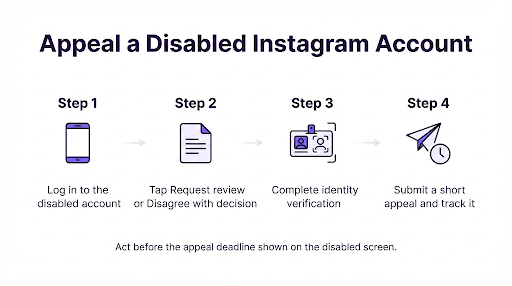
Appeal from the disabled account itself. This is the official route, and it’s the one that sends your case into Instagram’s review system.
- Open the Instagram app or go to instagram.com and log in to the disabled account with your usual username and password.
- Read the message on the screen. It usually tells you why the account was disabled and how long you have to respond.
- Tap the option to request a review (it may be labeled “Disagree with decision” or “Request review”).
- Complete any identity check. Instagram may ask you to confirm your email or phone number, take a video selfie, or upload a photo of a government-issued ID.
- Add a short, clear explanation if there’s a text box. Say why you think the decision was a mistake.
- Submit it and write down the date. You’ll want it if you need to follow up later.
Meta has been changing how verification works. In its December 2025 support update, Meta announced a centralized support hub on Facebook and Instagram. It also added an optional video selfie that people can use to verify their identity during account recovery.
What Should You Write in Your Appeal?
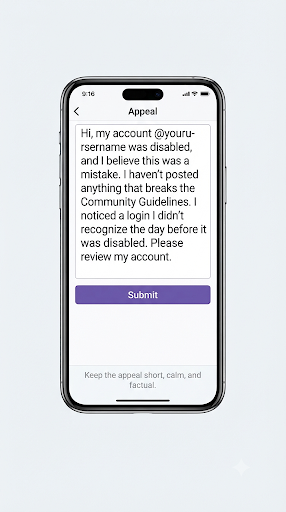
Keep it short, calm and factual. A reviewer has to understand your case quickly. Long, angry messages don’t help.
- Give your username and the email or phone number linked to the account.
- Say plainly that you believe the account was disabled by mistake.
- If you know what may have triggered it, explain it in one or two sentences. For example: “I recently logged in from a new phone while traveling” or “My account was hacked before it was disabled.”
- Ask them to review the decision.
Example: “Hi, my account @yourusername was disabled, and I believe this was a mistake. I haven’t posted anything that breaks the Community Guidelines. I noticed a login I didn’t recognize the day before it was disabled. Please review my account. My registered email is the one linked to this profile.”
How Do You Check the Status of Your Appeal?
Open Account Status or tap the violation in your Support Inbox. Instagram says you can check your review request there at any time.
Reviews don’t happen on a fixed schedule. Some people hear back within a day or two. Others wait much longer. While you wait, check the email linked to your account (including spam and promotions folders) for messages from Instagram or Meta.
Tip: Don’t send the same appeal over and over. Repeated submissions rarely speed things up and can make your case harder to follow.
What If You Don’t See an Appeal Option?
If there’s no appeal button, go through the Instagram Help Center or the Meta AI support assistant instead of guessing at random forms.
- Visit the Instagram Help Center and search for “My account was disabled.” Follow the current instructions on that page.
- Try the Meta AI support assistant. Meta rolled it out in places where Meta AI is available, in the Facebook and Instagram apps and in the desktop Help Center. It can walk you through login and recovery problems.
- Use the Meta account recovery hub. The Meta Account Recovery Hub brings recovery guidance for Facebook, Instagram and Threads into one place.
- Try a different device or browser. Some forms don’t load in every browser, and a few people only see the appeal prompt on mobile.
Be careful with old form links passed around on forums and in videos. Meta has retired several older standalone forms. If a link opens a broken or unsupported page, go back to the Help Center and start from there.
Does Meta Verified Help With a Disabled Account?
It can, but it’s not a guaranteed fix. Meta Verified subscribers get email and chat support for account issues, so it’s the closest thing Instagram has to talking with a person.
There are some limits you should know about before you pay:
- Support is tied to the subscribed account. Many people subscribe on a second, working account to reach an agent. The agent may still say they can’t reopen a disabled account, especially for serious violations.
- You may need to log in. Some users have reported that they couldn’t use their subscription’s support features because the locked account was the one subscribed.
- Agents may only escalate, not decide. A chat agent might forward your case or ask you to wait for an update, but the final decision still comes from the review process.
If your account matters for your income or business, Meta Verified is worth trying after you’ve submitted the official appeal. Just go in knowing that the subscription buys you access to support, not a promised outcome.
What If Your Account Was Hacked and Then Disabled?
Treat it as a hacked account first. Hackers often post spam or change account details, and that activity can get the account disabled.
- Go to instagram.com/hacked to start the official recovery flow.
- On the login screen, tap Get help logging in and enter the username, email or phone number linked to the account.
- Check your email for messages from Instagram about changed email addresses or passwords. These messages often include a link to undo the change.
- In your appeal, mention that unusual activity happened before the account was disabled.
If your Facebook account was affected too, the steps are similar but not identical. This guide on contacting Facebook support about a hacked account walks through the Facebook side, which helps when both accounts are linked in Accounts Center.
Are There Other Official Ways to Escalate?
Yes, in some situations. These aren’t first steps, but they matter if the normal appeal fails.
- Business and advertiser accounts: If you run ads, contact Meta through Meta Business Support Home.
- Content decisions: Instagram lets people appeal some content decisions to the Oversight Board after the internal review is finished. Check the Help Center to see whether your case qualifies.
- Users in the European Union: Independent dispute bodies such as the Appeals Centre Europe review disputes about platform decisions, including Instagram’s.
How Do You Avoid Fake Instagram Support Scams?
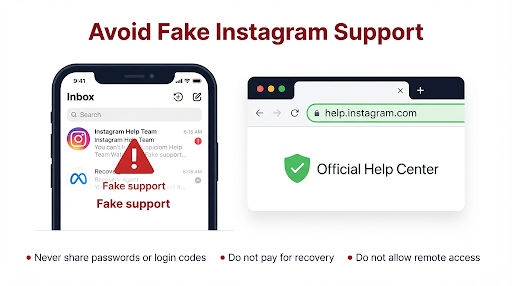
Never trust a phone number, DM or “recovery agent” that says it’s Instagram support. Instagram doesn’t run a customer service phone line, so any number posted online as one is not official.
Scammers watch for people posting about disabled accounts in comments, forums and Reddit threads. They offer “guaranteed recovery” for a fee, then disappear or take over other accounts too.
- Don’t share your password, login codes or backup codes with anyone.
- Don’t pay a stranger to “unban” your account.
- Don’t trust DMs from accounts with names like “Instagram Help Team.” Instagram doesn’t reach out through DMs to fix disabled accounts.
- Only use links that start with help.instagram.com, instagram.com, meta.com or facebook.com.
What Mistakes Slow Down Disabled Account Recovery?
Most delays come from a few avoidable mistakes:
- Missing the appeal deadline. Once the window shown on your screen closes, your options get much narrower.
- Creating a new account to dodge the ban. This can break Instagram’s rules and hurt your chances with the original account.
- Using an email or phone number you no longer have. Update your contact details in Accounts Center on any active Meta accounts you still control.
- Sending blurry or mismatched ID photos. Use good lighting and make sure the name matches the details on the account.
- Relying on third-party apps. Follower or automation tools that ask for your login can trigger more enforcement.
FAQs
Does Instagram have a customer service phone number?
No. Instagram doesn’t offer a customer service phone line for account recovery. Some Help Center pages offer a call from a Meta AI assistant, but you should only start that from inside the official Help Center, never from a number you found in a search result or post.
Is there an Instagram support email for disabled accounts?
There’s no public email inbox you can write to. You may get email replies after you submit an appeal or form, and Meta Verified subscribers get email support. Otherwise, use the in-app appeal and the Help Center.
How long does Instagram take to review a disabled account appeal?
Instagram doesn’t publish a fixed time. Some reviews finish in a day or two, and others take weeks. Check Account Status or your Support Inbox for updates instead of resubmitting.
What happens if my appeal is rejected?
If the review doesn’t go your way, the account may be permanently disabled, and Instagram may not offer another review. Depending on your case and where you live, you might still be able to use the Oversight Board or an EU dispute body. Read the decision message carefully for any next steps.
Can I recover my photos if the account stays disabled?
Usually not through normal tools, because you can’t log in to download your data. That’s why it’s worth turning on two-factor authentication and downloading a copy of your information now on any accounts you care about.
Why was my Instagram account disabled without warning?
Accounts can be disabled for suspected Community Guidelines violations, unusual login activity, signs of automation, impersonation reports or age requirements in some regions. Automated systems sometimes get it wrong, which is exactly why the review option exists.
What Should You Do Next?
Start with the official appeal today. Log in to the disabled account, request a review, finish any identity check and write a short, honest explanation. Then track your case in Account Status or your Support Inbox.
If you don’t see an appeal option, go to the Instagram Help Center or the Meta AI support assistant. If the account matters for your work, try Meta Verified support as a backup. And whatever happens, stay away from anyone who promises to restore your account for money.