
To contact Max customer service about a billing issue, first find out who actually bills you. Open HBOMax.com/subscription or go to Profile > Subscription in the app. If it says WarnerMedia Direct, contact HBO Max through the Contact Us option at help.hbomax.com. If it names Apple, Google Play, Amazon, Roku, or your cable or internet provider, that company handles your billing, not HBO Max.
This one check saves most people a lot of wasted time. HBO Max support can’t refund or change a subscription that another company bills. Below you’ll find the exact steps, the contact option for each billing provider, what to have ready, and fixes for the most common charge problems.
Quick Overview
| Who bills you | Who to contact for billing help |
| WarnerMedia Direct (you signed up at HBOMax.com) | HBO Max support at help.hbomax.com (Contact Us, live chat) |
| Apple (iPhone, iPad, Apple TV) | Apple Support or reportaproblem.apple.com |
| Google Play (Android) | Google Play support at g.co/play/subscriptions |
| Amazon Appstore or Prime Video Channels | Amazon customer service |
| Roku | Roku support at my.roku.com/subscriptions |
| Hulu, YouTube TV, Samsung | That company’s account or help page |
| Cable, internet, or mobile provider (Xfinity, Spectrum, DIRECTV, Verizon, Optimum, and others) | Your provider’s customer service |
Is Max the Same as HBO Max?
Yes. Max and HBO Max are the same streaming service. Warner Bros. Discovery switched the name from Max back to HBO Max on July 9, 2025, about two years after it first dropped “HBO” from the name. Max.com now redirects to HBOMax.com, and the app updated on its own.
So if you’re searching for “Max customer service,” the official support site you want is help.hbomax.com. Your account, plan, and billing did not change with the name.
Make Sure You Have the Right “Max”
Search results for “Max customer service” mix in companies that have nothing to do with streaming. Before you call any number, check that it belongs to the right business:
- MAX Credit Union is a bank in Alabama. Its phone numbers won’t help with a streaming charge.
- Max Mara is a fashion brand.
- Newsmax is a news network with its own subscription.
- Duolingo Max is a paid tier of the Duolingo app.
If the charge on your statement says HBO Max, WarnerMedia, or names an app store with “HBO Max” in the description, you’re in the right place.
How Do You Find Out Who Bills You for HBO Max?
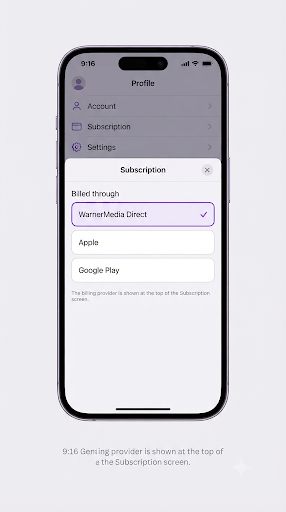
The billing provider is listed at the top of your Subscription page. Here’s how to open it on each device:
- Web browser: Go to HBOMax.com/subscription and sign in.
- Phone, tablet, or computer app: Tap your profile, then choose Subscription.
- TV or streaming device: Select the Settings (gear) icon in the lower left, then choose Subscription.
- Look at the top of the screen. It shows who bills your base plan.
Tip: Only Adult profiles can manage subscriptions. If you’re on a Kids profile, switch profiles first.
Can’t sign in? Check your bank or card statement instead. The charge description usually names the biller, such as “APPLE.COM/BILL,” “Google,” “Amazon,” or “HBO Max.”
If you also can’t access the email tied to your account, you’ll need to fix that first. Our guide on getting back into a locked Gmail account through Google support walks through that process.
How Do You Contact HBO Max Directly About Billing?
If WarnerMedia Direct bills you, use the official Help Center. It’s the most reliable way to reach a real agent for charges, refunds, and payment problems.
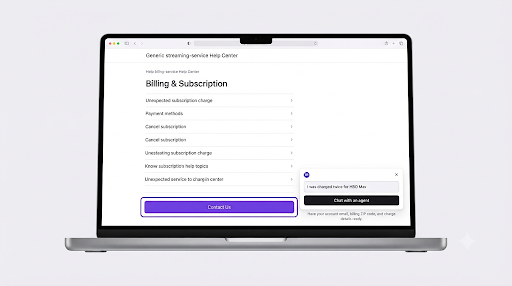
- Go to the HBO Max Help Center’s unexpected charge page or the main help.hbomax.com site.
- Scroll to the bottom and select Contact Us.
- Pick the topic that matches your issue, such as billing or subscription.
- Start a live chat. You may talk to a bot first. Ask for an agent if the bot can’t solve it.
You can also reach the Help Center from inside the app. Open your profile, go to Settings, and look for the Help option.
Is There an HBO Max Customer Service Phone Number?
HBO Max doesn’t list a phone number on its US Help Center. That said, a phone line does exist. Tom’s Guide confirmed (855) 942-6669 by calling it and reached an agent in about five minutes. Some consumer sites also list (855) 442-6629.
Be careful with phone numbers you find online. Scam sites often post fake “Max support” numbers to collect card details. If you call, never give out your full card number or a one-time passcode to someone who called you first. When in doubt, start from help.hbomax.com and use the chat.
Does HBO Max Have a Support Email?
No. HBO Max doesn’t publish a direct support email address. Written requests go through the Contact Us form in the Help Center. Live chat is usually faster for billing issues.
What Should You Have Ready Before You Contact Support?
Gathering a few details first makes the chat or call much shorter. HBO Max asks for:
- The email address on your HBO Max account
- Your billing ZIP code
- The date and amount of each charge you’re asking about
- The payment method used (credit card, debit card, PayPal, or Apple Pay)
- A screenshot of the charge on your statement, if you have one
If you have more than one email address, check each one. Many duplicate-charge problems come from a second account you forgot about.
How Do You Contact Your Third-Party Billing Provider?
If another company bills you, contact that company. HBO Max will usually send you back to them anyway. Here’s where to go for each one:
| Provider | Where to manage or get help |
| Apple | iPhone or iPad: Settings > your name > Subscriptions. For refunds, use Apple’s Report a Problem site. |
| Google Play | g.co/play/subscriptions |
| Amazon Appstore | amazon.com/appstoresubscriptions |
| Amazon Prime Video Channels | amazon.com/video/subscriptions/manage |
| Roku | my.roku.com/subscriptions |
| Samsung | samsungcheckout.com > Purchase History > Subscriptions |
| Hulu (HBO Max add-on) | hulu.com/account > Your Subscriptions |
| YouTube TV | tv.youtube.com > Settings > Membership |
| Optimum | optimum.net/login or call 866-213-8225 |
| WOW! | login.wowway.com or call 855-496-9929 |
| Xfinity, Spectrum, Cox, DIRECTV, DISH, Verizon | Sign in to your provider account or contact its customer service |
If you pay through YouTube TV, the fastest route is usually its in-app chat. Here’s how to use YouTube TV customer service chat on an iPhone.
Note: If HBO Max comes bundled with your cable, internet, or mobile plan, you may not see a separate HBO Max line on your bill. It’s included in the package price, so ask your provider for a breakdown.
Why Was I Charged by HBO Max Unexpectedly?
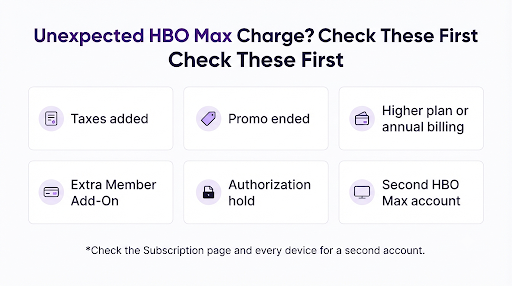
Most surprise charges have a simple cause. Check these before you contact support, because one of them often explains it.
The Amount Is Higher Than Expected
- Taxes: Sales tax is added based on your billing ZIP code.
- Promo ended: A discounted or promotional price may have run out, so you now pay the regular rate.
- Different plan: You might be on a higher tier or a yearly plan. Current US prices are $10.99/month for Basic with Ads, $18.49/month for Standard, and $22.99/month for Premium.
- Add-ons: The Extra Member Add-On and pay-per-view purchases are billed separately from your base plan.
You Were Charged Twice
- Authorization hold: New subscribers may see a temporary hold that checks your card. It usually drops off within 7 to 10 days, depending on your bank.
- Two accounts: Each account with an active subscription bills separately. This often happens when you sign up once on a TV and again on your phone with a different email.
- Add-on bought on a different day: If you bought the Extra Member Add-On on a different day than your plan started, you’ll see two charges each month.
To check for a second account, open HBO Max on every device you use. Go to Account and note the email address on each one. If you find two, check the Subscription page of each to see who bills it.
You Were Charged After Canceling
- You canceled too close to your renewal date. HBO Max recommends canceling at least 24 hours before your next billing date.
- The cancellation didn’t go through. On HBOMax.com/subscription, a canceled plan shows a Resume Your Subscription button.
- You canceled with the wrong account or the wrong provider.
- You deleted the app. Deleting the app does not cancel your subscription.
You Never Signed Up
Find the charge on your statement and see who made it.
If an app store charged you, cancel there or contact that store. If the charge came from HBO Max directly, note the date and amount, then contact HBO Max. Also check whether a family member signed up using your card.
Can You Get a Refund From HBO Max?
It depends on who bills you. According to HBO Max’s refund policy, subscriptions billed directly through WarnerMedia Direct have a no-refund policy. HBO Max still asks you to contact support about unexpected charges or billing concerns, so it’s worth reaching out if you think you were charged in error.
There’s one exception in the US. New York State subscribers billed directly may qualify for a prorated refund if they cancel within 14 days of their first bill after a price increase.
If a third party bills you, its own refund rules apply. Apple, Google Play, Amazon, and Roku each review refund requests on their own terms.
This works the same way on other streaming services. If you also deal with Netflix billing, see how to contact Netflix customer service from the Netflix app.
Should You Dispute the Charge With Your Bank Instead?
Try HBO Max or your billing provider first. HBO Max’s own help pages say that if it bills you directly, you should contact HBO Max instead of your payment service. Support can often fix the problem faster, such as by finding a duplicate account or canceling a forgotten plan.
Save a bank dispute for cases where you never authorized the charge and support didn’t help. Keep screenshots of your chat, the charge, and your cancellation email in case you need them.
How Do You Fix Payment Problems on a Directly Billed Account?
If your card was declined or you need to change how you pay:
- Go to HBOMax.com, sign in, and open Subscription.
- Choose Payment Method.
- Add or update your card details and save.
No Payment Method option? That means another company bills you, so update your payment with them. Also keep in mind that some prepaid cards don’t support recurring payments.
Need a receipt? On a WarnerMedia-billed account, open Subscription > Payment History and choose a payment date. For receipts from 2024 or earlier, you’ll need to contact HBO Max support.
Common Mistakes That Slow Down a Billing Fix
- Calling HBO Max when Apple or your cable company bills you. They’ll send you back to that company.
- Calling a number from a random website. Some are fake or belong to a different “Max.”
- Checking only one account. A forgotten second email is a top cause of double charges.
- Canceling on the last day. Cancel at least 24 hours early.
- Deleting the app and assuming you’ve canceled. You haven’t.
- Going into chat without details. Have your email, ZIP code, and charge dates ready.
Account access problems can also block billing changes on other platforms. If you run into a locked social account too, here’s how to contact Instagram support about a disabled account.
Frequently Asked Questions
Is HBO Max customer service available 24/7?
HBO Max’s online Help Center is available at any time. Live chat availability can vary, and HBO Max doesn’t post official chat hours on its US help pages. If chat isn’t available, submit the Contact Us form and you’ll get a reply by email.
How do I talk to a live person at HBO Max?
Start a chat from Contact Us at help.hbomax.com. If a bot answers, type “agent” or ask for a representative. A live agent is the best option for refunds, duplicate charges, and account-specific questions.
Why can’t I change my plan or payment in the HBO Max app?
You likely see a message like “Changes to your subscription can’t be made on this device.” This usually means a third party bills you, or you’re on a non-Adult profile. Try HBOMax.com/subscription in a web browser on an Adult profile.
Why is there an HBO Max charge from Apple on my statement?
You, or someone using your Apple ID, subscribed through the HBO Max app on an Apple device. Apple handles that billing. Check Settings > your name > Subscriptions on your iPhone, and request any refund through Apple.
Will I lose access right away if I cancel?
No. After you cancel, you can keep streaming until the end of your current billing period. You’ll also get a confirmation email, which is good to save.
My HBO Max came free with my phone or internet plan. Why am I being charged?
Your bundle may have ended, or you may have signed up for a separate HBO Max account by mistake. Check the Subscription page to see who bills you. If it’s your provider, ask them about the end date of the offer.
What Should You Do Next?
Open HBOMax.com/subscription right now and check who bills you. That single step tells you exactly who can fix your charge.
- Billed by WarnerMedia Direct: Go to help.hbomax.com, choose Contact Us, and start a live chat with your account email, ZIP code, and charge details ready.
- Billed by an app store or device: Contact Apple, Google, Amazon, Roku, or Samsung directly for changes and refunds.
- Billed by your cable, internet, or mobile provider: Call or sign in to your provider account.
- Charged twice: Check every device for a second account before you contact anyone.
Most billing problems are solved in one chat once you’re talking to the right company.