
You can contact Hulu customer service without logging in by calling Hulu’s 24/7 support line from the official Hulu Help Center, opening the Help Center chat from any support article, or messaging Hulu’s support team on X or Facebook. Phone support is the best option when you are locked out, because a live agent can verify you with details like your billing info instead of your password.
Below, you will find every working contact option, which one fits your problem, what details to keep ready, and how to avoid the fake “Hulu support” numbers that show up all over search results.
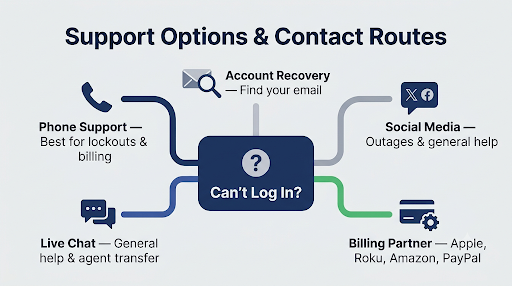
Quick Overview
| Contact Method | Login Needed? | Best For |
| Phone support (number shown on help.hulu.com) | No | Lockouts, hacked accounts, billing problems, cancellations |
| Hulu Virtual Assistant and live chat | Not to start, but it may ask you to sign in for account changes | General questions, transfer to a live agent |
| Account Recovery tool | No | Finding the email address tied to your account |
| X (@hulu_support) and Facebook | No | Outages, general help, getting pointed to the right team |
| Your billing partner (Apple, Roku, Amazon, PayPal, etc.) | No Hulu login needed | Charges and cancellations if Hulu does not bill you directly |
What Is the Fastest Way to Reach Hulu Support Without Logging In?
Calling Hulu is the fastest way. Hulu’s Help Center says live support is available 24 hours a day, 7 days a week, and the phone line does not require you to sign in first.
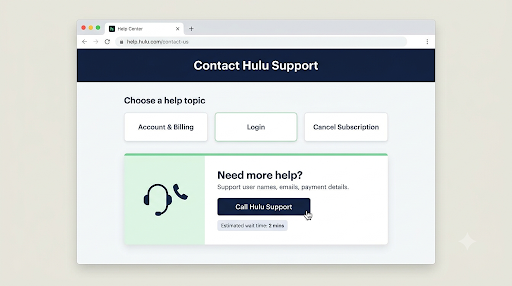
Here is how to reach a real person:
- Go to the official Hulu Help Center contact page in any browser. You do not need to sign in to view it.
- Pick the topic closest to your problem, such as Account & Billing or Login.
- Look for the Call Hulu or Talk to Hulu Support box. It shows the support number and the current estimated wait time.
- Call the number and follow the voice prompts. Say “representative” or “agent” if you want to skip the automated menu.
- Explain that you cannot log in and ask the agent to verify your account another way.
At the time of writing, Hulu’s own help pages list 1-888-755-7907 on the cancellation support page and 1-877-824-4858 on some account and billing pages. Hulu shows different numbers depending on the topic you choose, so the safest move is to use the number displayed on help.hulu.com for your exact issue.
Which Hulu Phone Number Should You Use?
| Number | Where It Appears | Use It For |
| 1-888-755-7907 | Hulu Help Center (cancel subscription page) | Cancellations and general account help |
| 1-877-824-4858 | Hulu Help Center (account and billing pages) | Billing, charges, plan and subscription issues |
| 1-855-738-6978 | Hulu’s U.S. State Privacy Rights page | Privacy requests such as data access or deletion |
| 1-888-265-6650 | Third-party directories like GetHuman | Not shown on Hulu’s own pages, so confirm it on help.hulu.com first |
Tip: Phone numbers can change. If a number in any article (including this one) does not match what Hulu’s Help Center shows today, trust the Help Center.
Can You Use Hulu Live Chat Without Signing In?
Yes, you can usually open the chat without signing in. The Hulu Virtual Assistant appears on Help Center pages and can answer common questions, and you can ask it to connect you with a live agent.
The catch is that chat works best for logged-in users. If you need changes made to your account, such as updating payment details or canceling, the assistant may ask you to sign in first. When that happens and you are locked out, switch to phone support instead of going in circles with the bot.
To get the most out of chat:
- Type “talk to an agent” or “live agent” early to skip scripted answers.
- State clearly that you cannot access your account.
- Ask for a phone transfer or callback if the chat cannot verify you.
What If You Forgot the Email Address on Your Hulu Account?
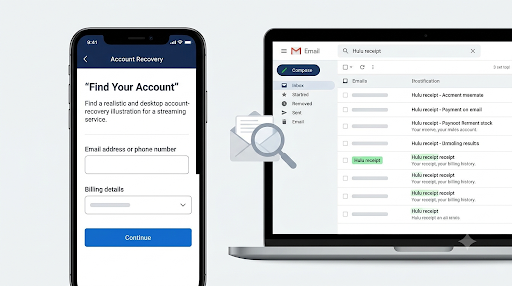
Use Hulu’s Account Recovery tool before you call. It can help you find the email address tied to your account by matching billing details, and it does not require a login.
Try these steps first:
- Search every inbox you own for emails from Hulu or Disney, such as welcome emails, receipts, or password reset messages.
- Check saved passwords in your browser, phone, or password manager.
- Open the Account Recovery tool and enter the payment info you used to subscribe.
- If you still cannot find the email, call Hulu support with your billing details ready.
Important: The Account Recovery tool may not find your account if you pay through a third party like Apple, Roku, Amazon, Google Play, Spotify, or a mobile carrier. Hulu does not hold that payment information, so it cannot match it.
Why Does Hulu Ask for a MyDisney Login Now?
Hulu now uses MyDisney accounts for sign-in. That means one email and password work across Hulu, Disney+, ESPN, and other Disney services.
This change trips up a lot of people. If your old Hulu password suddenly stopped working, you may need to finish setting up your MyDisney account or reset your password through the MyDisney prompt. Eligible Hulu subscribers can also stream Hulu content inside the Disney+ app using the same MyDisney login, which is useful to know if one app works and the other does not.
Before you call support, try this quick check:
- Make sure you are using the email linked to your MyDisney account, not an old Hulu-only email.
- Use Forgot password on the login screen and check spam for the reset code.
- Wait before retrying if you see a “too many attempts” message. Repeated attempts can keep you blocked longer.
Who Do You Contact If Hulu Is Billed Through Another Company?
If Hulu does not bill you directly, contact the company that charges you. Hulu support often cannot cancel, refund, or change a subscription managed by a partner.
Check your bank or card statement to see who is charging you:
| Charge Shows As | Who to Contact |
| Apple or iTunes | Apple subscriptions on your iPhone, iPad, or Apple ID |
| Google Play | Google Play subscriptions |
| Roku | Your Roku account subscriptions page |
| Amazon | Amazon “Your Memberships and Subscriptions” |
| PayPal | PayPal automatic payments settings |
| Spotify, Verizon, or another carrier or bundle | That provider’s account or support team |
PayPal billing is one of the most common sources of confusion, because the charge can keep running even when you cannot get into Hulu. If that sounds like your situation, follow this guide on how to cancel a Hulu subscription billed through PayPal to stop the payment from your PayPal account.
What Should You Do If Your Hulu Account Was Hacked?
Call Hulu support right away. A hacked account is the one situation where chat and social media are not enough, because an agent needs to verify you as the real owner.
Here is a smart order of steps:
- Secure your email first. Change the password on the email account tied to Hulu, since anyone with that inbox can reset your Hulu password.
- Call Hulu using the number on help.hulu.com and say your account was taken over.
- Share billing details, the last four digits of your card, recent charge dates, or your old email address so the agent can confirm ownership.
- Once you are back in, change your password and choose the option to log out of all devices.
- Review your devices and profiles for anything you do not recognize.
If your payment card was charged without your permission, contact your bank too. They can block future charges while Hulu sorts out the account.
Can You Contact Hulu on Social Media?
Yes. You can message Hulu’s support team on X at @hulu_support or reach Hulu through its official Facebook page. Social channels work well for outage updates and general questions, and an agent can point you to the right next step.
Never post your email, password, phone number, or payment details publicly. If the team needs account info, they will ask you to move to a private message or call support.
Does Hulu Have a Customer Service Email?
No, Hulu does not publish a public customer service email address. Written help runs through the Help Center, the Virtual Assistant, and chat. If you see a “Hulu support email” on a random website, be careful, because it may not belong to Hulu.
What Information Should You Have Ready Before You Call?
Having the right details ready can cut your call time in half, especially when you cannot log in. Keep these handy:
- Any email addresses you might have used to sign up
- Your full name and ZIP code
- The last four digits of the card or the PayPal email used for payment
- Dates and amounts of recent Hulu charges
- Your plan type, such as Hulu (With Ads), Hulu (No Ads), Hulu + Live TV, or a Disney bundle
- The exact error message you see, plus the device you are using
Example: Saying “I can’t log in, my card ending in 4417 was charged $18.99 on November 3, and I think I signed up with an old Yahoo email” gives the agent everything needed to find your account quickly.
How Do You Avoid Fake Hulu Customer Service Numbers?
Only trust numbers shown on help.hulu.com or hulu.com. Search results are full of PDFs, forum posts, and lookalike help pages that list “Hulu helpline” numbers run by scammers.
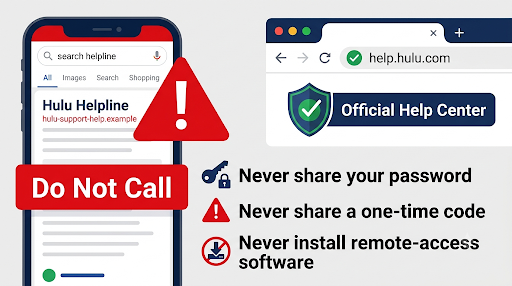
Watch for these red flags:
- The page is not on a hulu.com address
- The “agent” asks for your full password or a one-time verification code
- You are told to pay a fee to recover your account or to buy gift cards
- Someone asks you to install remote access software on your computer
- The number appears with odd formatting like “+1||855||…” in a document
Real Hulu agents may ask questions to verify you, but they will not ask for payment to fix a login problem.
Common Mistakes That Slow Down Hulu Support
- Calling the wrong company. If Apple or Roku bills you, Hulu may not be able to cancel or refund.
- Making repeated login attempts. This can extend a temporary lockout.
- Using an old Hulu-only email after the MyDisney switch.
- Staying stuck in chat when the bot keeps asking you to sign in. Call instead.
- Trusting a number from a random website without checking the Help Center.
Frequently Asked Questions
Is Hulu customer service available 24/7?
Yes. Hulu’s Help Center says live support is available 24 hours a day, 7 days a week. Wait times vary, and the Help Center usually shows the current estimated wait next to the phone number.
Can I cancel Hulu without logging in?
Often, yes. If Hulu bills you directly, a phone agent can help you cancel after verifying you. If a partner bills you, cancel through that partner’s account, which does not need your Hulu login at all.
Can I talk to a live person at Hulu in the USA?
Yes. Call the number on help.hulu.com and use the voice prompts, or ask the Virtual Assistant to transfer you to a live agent. Phone support is usually quicker for account access problems.
What if Hulu says my account does not exist?
You may be using a different email than the one on the account, or your subscription may be billed through a partner that created the account for you. Check your billing statement, try the Account Recovery tool, and then call support if neither works.
Will Hulu support ask for my password?
No. Hulu agents may verify your identity with billing details or account info, but you should never share your full password or a one-time code. Anyone asking for those is likely not Hulu.
Is there a separate number for Hulu + Live TV problems?
Hulu routes support by topic through its Help Center. Choose the Live TV topic on help.hulu.com, and it will show the right contact option for that issue.
Final Recommendation
If you cannot log in, start with the Hulu Help Center contact page and call the number it shows for your issue. Use the Account Recovery tool first if you only forgot your email, contact your billing partner if Hulu does not charge you directly, and pick up the phone right away if your account was hacked. Keep your billing details ready, ignore support numbers from unofficial sites, and you should be back to streaming without the runaround.