
To contact Netflix customer service from the Netflix app, open the app on your phone or tablet, tap My Netflix in the lower right, tap your profile name or the menu icon at the top, tap Help, and then choose Call or Chat. If you are not signed in, tap Help in the upper right of the opening screen instead.
That is the whole route. But a lot of people get stuck on the details: the Help option looks different after an update, the Call button fails, or they can’t sign in at all. This guide covers the exact steps, what to do when something goes wrong, and how to make sure you are talking to the real Netflix and not a scammer.
Quick Overview
| Your situation | Where to tap in the Netflix app |
| Signed in to your account | My Netflix (lower right) > profile name or menu icon (top) > Help > Call or Chat |
| Signed out, locked out, or not a member | Help (upper right of the opening screen) > Call or Chat |
| Call button won’t connect | Update the app, check your Wi-Fi or cellular data, then try Chat |
| Watching on a TV or computer | Use the Netflix app on a phone or tablet, or go to help.netflix.com in a browser |
How Do You Contact Netflix Customer Service From the Netflix App?
You reach Netflix support through the Help screen inside the mobile app. According to Netflix’s own guide to contacting Netflix from the app, this feature works in the Netflix app for iPhone, iPad, and Android phones and tablets.
Steps for members who are signed in
- Open the Netflix app and sign in.
- Tap My Netflix in the lower-right corner.
- At the top of the screen, tap your profile name or the menu icon (three lines).
- Tap Help.
- Tap Call to talk to an agent, or Chat to message one.
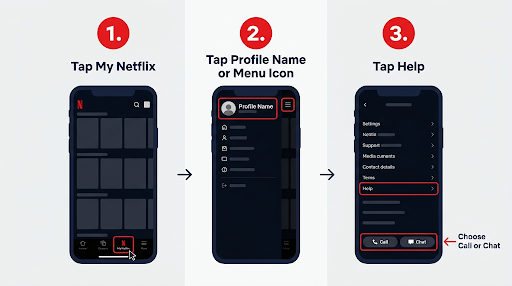
Why does Netflix say “profile name or menu icon”? Because the top of the My Netflix screen has changed across app versions. Some versions show your profile name with a small arrow. Others show a menu icon in the upper right. Both lead to the same menu, and Help sits near the bottom of it.
Steps if you are signed out or not a member
- Open the Netflix app.
- Tap Help in the upper-right corner of the opening screen.
- Tap Call or Chat.
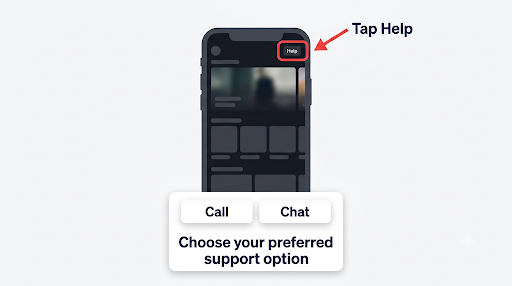
This path matters more than most guides admit. If you forgot your password, lost access to your email, or someone changed your login details, you can still reach support from the signed-out screen. You don’t need to get back into your account first.
Is It the Same on iPhone and Android?
Yes, the path is the same on iPhone, iPad, Android phones, and Android tablets. The icons and spacing can look a little different, but My Netflix, Help, Call, and Chat use the same names on both platforms.
One practical difference shows up with permissions. An in-app call uses your microphone, so if you denied microphone access to Netflix in the past, the call may connect without the agent hearing you. Check this before you call:
- iPhone or iPad: Settings > Netflix > turn on Microphone.
- Android: Settings > Apps > Netflix > Permissions > Microphone > Allow.
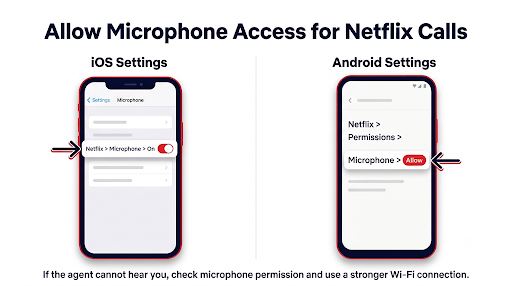
Menu names in Android settings vary by phone brand, so your path may read slightly differently.
Should You Call or Chat With Netflix Support?
Chat is usually the better pick for account, billing, and login questions, while a call is better when the problem is easier to explain out loud. Both connect you to the same support team.
| Factor | Call | Chat |
| Best for | Complex problems, step-by-step troubleshooting while you test the app | Billing questions, sign-in help, quick account changes |
| What you need | Stable Wi-Fi or cellular data, microphone access | Any working internet connection |
| Cost | No long-distance charges; your carrier’s data rates may apply | Your normal data use only |
| Multitasking | Harder, since you are on a voice call | Easier, and you can copy details like error codes |
| If one fails | Switch to Chat | Try Call or use help.netflix.com in a browser |
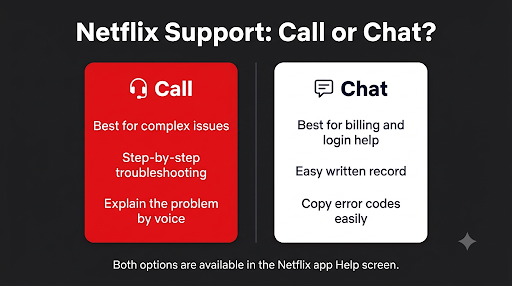
Netflix states that calls made through the app over Wi-Fi or cellular data are free of long-distance charges, though data rates from your mobile provider can still apply. If you are on a limited data plan, connect to Wi-Fi first.
What Should You Do If the Call or Chat Button Doesn’t Work?
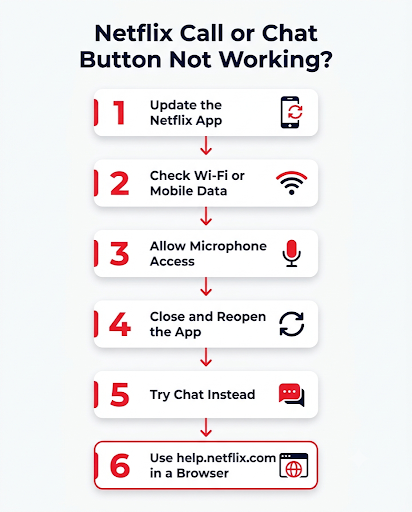
Start by updating the Netflix app. That is Netflix’s own first fix. If you are on the latest version and the voice call still won’t connect, Netflix recommends switching to Chat.
Work through these checks in order:
- Update the app. On iPhone or iPad, follow Netflix’s steps to update the Netflix app on iPhone or iPad through the App Store. On Android, open the Netflix page in the Play Store and tap Update. If you don’t see Update, you already have the latest version.
- Check your connection. In-app calls need a stable Wi-Fi or cellular data connection. A weak signal often causes dropped or silent calls.
- Allow microphone access. See the permission steps in the section above.
- Close and reopen the app. This clears a stuck Help screen more often than you’d expect.
- Switch to Chat. If voice still fails, Chat uses less bandwidth and usually works.
- Use a browser. Go to help.netflix.com on any phone or computer and open the contact option there.
What if you can’t find Help at all?
If Help is missing from the menu, you are usually looking in the wrong spot or using an old app version. Tap My Netflix first (it is a tab at the bottom, not the top), then open the profile name or menu icon. Still nothing? Update the app. Older versions put Help in a different menu, and very old versions may stop working with Netflix altogether.
Can You Contact Netflix From the App on a Smart TV or Computer?
Not in the same way. Netflix’s in-app Call and Chat steps are written for the iPhone, iPad, and Android apps. If you watch on a smart TV, game console, streaming stick, or computer, the fastest move is to grab your phone, open the Netflix app, and follow the steps above.
Here’s a real-world example. Say your TV shows an error code and won’t play anything. Write down the code, then contact Netflix from your phone app. The agent can walk you through fixes on the TV while you hold the phone. That is one of the few times a call beats a chat.
How Do You Contact Netflix About Billing, Login, or Payment Issues?
Use the same Help > Call or Chat path for all of these. What changes is who can actually fix the problem and what you should have ready.
Login problems and account recovery
If you only forgot your password, you may not need an agent. Netflix’s login help page lets you reset it by email or text. If you don’t remember the email or phone number on the account, choose the option for that on the same page. Netflix may ask for your first name, last name, and the card you use to pay.
If none of that works, or you think someone took over your account, use the signed-out Help path and choose Chat. Explain that you can’t sign in and that you suspect unauthorized changes.
Billing through Netflix vs. a partner
This is the information gap that trips up the most people. If someone other than Netflix bills you, Netflix support may not be able to change or cancel that billing. Common partners include Apple, Google Play, and phone or cable providers such as T-Mobile.
- Billed by Apple: Netflix says Apple billing is no longer offered to most new or returning members, but older accounts may still have it. Netflix’s page on billing through Apple points those members to Apple’s billing support.
- Billed by a phone or TV provider: Plan changes or cancellations for bundles such as T-Mobile’s Netflix offer usually go through that provider.
- How to check: Look at the Membership and Billing section of your Netflix account. It shows who handles your payments.
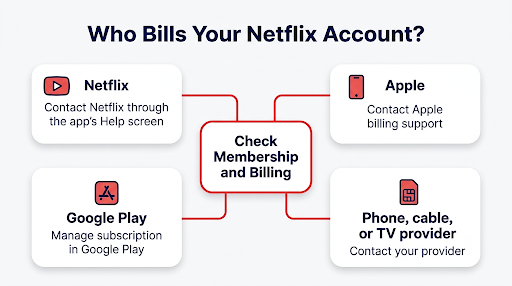
A common mistake is paying twice: once through a carrier bundle and once through Apple. If you see two charges, check both sources before you call anyone, so you can tell the agent exactly where each charge comes from.
The same idea applies to other streaming services. If you also pay for Prime Video, the support path works differently, and our guide on contacting Amazon customer service through the app walks through it.
Payment declined or unexpected charges
Before you contact Netflix, have these ready:
- The email address or phone number on the account
- The last four digits of the card on file (never share the full number in chat)
- The date and amount of the charge you are asking about
- A screenshot of any error message
How Can You Avoid Fake Netflix Customer Service Numbers?
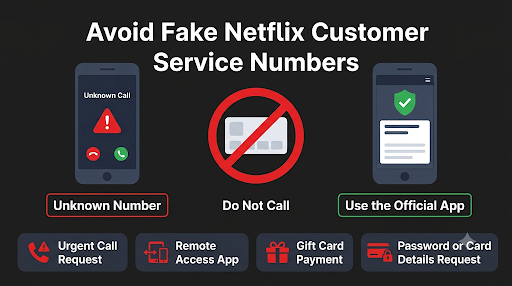
The safest way to reach Netflix is the Call or Chat button inside the official app, because you never have to dial a number you found somewhere else. This is a bigger deal than it sounds.
Search “Netflix customer service number” and you will find dozens of different phone numbers on directory sites, forum posts, and spammy pages. Some are outdated. Some belong to scammers. Fake support lines have been used to collect card numbers, account passwords, and even remote access to people’s computers.
Netflix’s guidance on phishing and suspicious messages spells out what the real company will never do:
- Ask for your card number, bank details, or Netflix password by email or text
- Ask you to pay through a third-party vendor or website
Watch for these red flags too:
- A pop-up, email, or text that tells you to call a number urgently
- An “agent” who asks you to install software or a remote-access app
- Requests for gift cards or payment outside your Netflix account
If you get a suspicious message, don’t reply or tap its links. Forward it to phishing@netflix.com and then delete it. If you already entered payment details on a fake site, contact your bank right away and change your Netflix password, plus any other account that used the same password.
Need a phone number anyway? Use only the one shown on netflix.com or help.netflix.com for your country. Numbers vary by region, and the official site is the only source you should trust.
Does Netflix Offer Email Support?
No. Netflix does not publish a customer service email address for general support. Your options are the in-app Call and Chat buttons, the contact page at help.netflix.com, and the phone number listed on Netflix’s site for your region. The phishing@netflix.com address is only for reporting scam messages, not for account help.
How Can You Get Your Issue Solved Faster?
A little prep can save you a long back-and-forth. Here is what tends to help:
- Search Help first. The Help screen in the app also searches Netflix’s help articles. Error codes like NW-2-5 or R26-1 often have a fix that takes two minutes.
- Lead with the error code. Type or say it exactly as it appears. It points the agent to the right fix quickly.
- Name the device. “Samsung TV from 2019” is far more useful than “my TV.”
- Say what you already tried. That keeps the agent from repeating steps you already did.
- Stay on Wi-Fi for calls. A dropped call means starting over.
FAQs About Contacting Netflix From the App
Can I contact Netflix customer service without an account?
Yes. Open the Netflix app without signing in, tap Help in the upper right, and choose Call or Chat. This works for people who are thinking about joining and for members who are locked out.
Is Netflix customer service available 24/7?
Netflix doesn’t post fixed support hours in its app contact guide, and availability can vary by country and language. In practice, the in-app Chat option is the most dependable way to reach someone at odd hours. If one option isn’t available, try the other.
Can I cancel my Netflix membership through customer service?
You can, but you usually don’t need to. If Netflix bills you directly, you can cancel yourself from your account settings. If Apple, Google Play, or a phone or cable provider bills you, cancel through that company instead, because Netflix support may not be able to stop those charges.
Why does my in-app call connect but the agent can’t hear me?
The Netflix app probably doesn’t have microphone permission, or your connection is too weak for voice. Turn on microphone access in your phone’s settings, move to stronger Wi-Fi, and try again. If it still fails, use Chat.
Will Netflix refund me if I contact support?
It depends on the situation. Netflix’s terms generally don’t offer refunds for partial months, but agents can look into charges you didn’t authorize or billing errors. Have the charge date and amount ready when you reach out.
Can extra members or profile users contact support?
Anyone can use the Help screen, but account changes usually need the account owner. If you are on someone else’s account, ask the owner to contact Netflix for billing or plan changes.
What Should You Do Next?
If you can sign in, open the Netflix app on your phone, go to My Netflix > profile name or menu > Help, and pick Chat for billing or login problems or Call for troubleshooting. If you’re locked out, tap Help on the signed-out screen. And whatever the issue, skip the phone numbers you find through search results. The button inside the official app is the safest way to reach the real Netflix team.