
The fastest way to ask Paramount+ for a refund is through live chat on the official Help Center at help.paramountplus.com. Go to Contact Us, choose Account & Billing, and ask for an agent. You can also call the long-listed U.S. support line at 1-888-274-5343. Before you do either, check who actually billed you. If you subscribed through Apple, Google Play, Amazon, Roku, or a bundle, Paramount+ usually can’t refund you, and you’ll need to ask that company instead.
Getting this part right saves a lot of time. Many refund requests get denied simply because people contacted the wrong company, or asked for the refund the wrong way. The steps below show you who to contact, what to say, and what to do if the first answer is “no.”
Quick Overview
| Your situation | Who to contact | Best method |
| Billed directly by Paramount+ (card or PayPal on paramountplus.com) | Paramount+ Support | Live chat at help.paramountplus.com, or call 1-888-274-5343 |
| Billed through iPhone, iPad, or Apple TV | Apple | reportaproblem.apple.com |
| Billed through Google Play (Android) | Google Play | Google Play order history and refund request |
| Billed through Amazon Prime Video Channels or Fire TV | Amazon | Amazon Memberships & Subscriptions or Amazon customer service |
| Billed through Roku | Roku | Roku account subscriptions page or Roku support |
| Included in Walmart+, a phone carrier plan, or another bundle | The bundle provider | The provider’s own customer service |
Does Paramount+ Actually Give Refunds?
Officially, Paramount+ does not refund fees you’ve already paid when you cancel. That’s the standard rule in the Paramount+ U.S. Terms of Use. If you cancel mid-month, you keep access until the end of your billing period, but you won’t get money back for the unused days.
That said, “no refunds” is the default, not an absolute rule. The same terms say that if Paramount+ issues a refund, credit, or discount, it isn’t required to do the same thing again in the future. In other words, refunds are handled case by case, at the company’s discretion. Many subscribers report getting a one-time refund when they ask politely, explain the situation clearly, and ask soon after the charge.
Your chances are usually better in these situations:
- You were charged right after cancelling, or the cancellation didn’t go through because of a site error.
- You were double charged, for example because you had two accounts or two billing sources.
- You didn’t authorize the charge, such as a family member signing up with your card.
- An annual plan renewed and you noticed right away without watching anything.
- You couldn’t use the service because of a long outage or a technical problem support couldn’t fix.
Your chances are low if you simply forgot to cancel a monthly plan weeks ago and kept streaming.
How Do You Find Out Who Billed Your Paramount+ Subscription?
Look at your bank or card statement first. The name on the charge tells you who to contact.
- “Paramount+” or “CBS Interactive” usually means direct billing from Paramount+.
- “Apple.com/bill” means you subscribed through the App Store.
- “Google” or “Google Play” means you paid through an Android device.
- “Amazon” or “Prime Video Channels” means Amazon billed you.
- “Roku” means you signed up on a Roku device.
You can also sign in at paramountplus.com and open your Account page. If you were billed by a partner, the page usually says so and won’t let you change billing there.
This is the most common mistake people make. They spend an hour on chat with Paramount+, only to learn the agent can’t touch an Apple or Google charge. Check first, then reach out.
How Do You Contact Paramount+ Customer Service for a Refund?
If Paramount+ billed you directly, you have three main ways to reach support. Live chat tends to be the quickest for billing questions.
Option 1: Live Chat Through the Help Center
- Go to the official Paramount+ U.S. Help Center.
- Select Contact Us.
- Choose Account & Billing when asked what you need help with.
- Answer the follow-up questions, then pick the option to connect with an agent.
- If a chatbot keeps sending you help articles, type “agent” or “customer support.” Subscribers on Reddit report this usually gets them to a live person faster.
Sign in to your account before you start the chat if you can. The agent can find your billing history much faster.
Option 2: Call Paramount+ Customer Service
The U.S. support number that has been listed for years, including in Paramount+’s older CBS All Access terms, is 1-888-274-5343. Published hours vary between sources, and phone support has shifted over time, so check the Contact Us page for current availability before you call.
If you get stuck in the phone menu, say “billing” or “speak to a representative.” Calling midweek, outside of evening hours, usually means shorter waits.
Option 3: Contact Form or Email
Paramount+ doesn’t really run a public refund email address for U.S. customers. Some complaint websites list an old CBS Interactive refund email, but there’s no current official page confirming it. Use the Help Center’s Contact Us flow instead, so your request ends up in Paramount+’s ticket system.
Which Paramount+ Support Method Should You Use?
| Method | Best for | Keep in mind |
| Live chat | Refund requests, duplicate charges, billing errors | You get a written record. Save or screenshot the transcript. |
| Phone (1-888-274-5343) | Complicated account problems, or if you prefer talking to someone | No written record unless you take notes. Hours can change. |
| Contact form | Issues that aren’t urgent | Slower replies. Not ideal if you need a quick decision. |
What Should You Say When Asking for a Paramount+ Refund?
Keep it short and specific. Agents handle a lot of chats, so a clear request is easier to approve.
Have this ready before you start:
- The email address on your Paramount+ account
- The date and amount of the charge
- The last four digits of the card that was charged (never the full card number)
- Your cancellation confirmation, if you cancelled
- A one-line reason for the refund
Here’s a simple message you can adapt:
“Hi, I was charged [amount] on [date] for my Paramount+ subscription. [I cancelled on (date) / I didn’t authorize this charge / I was charged twice / my annual plan renewed and I haven’t used it]. I’d like to request a refund for this charge. My account email is [email]. Can you help?”
A few tips that genuinely help:
- Ask soon. A request made the same day or week as the charge is far easier to approve than one made months later.
- Be polite but firm. If the first answer is “we don’t offer refunds,” ask whether a one-time exception or an account credit is possible.
- Cancel first if you don’t plan to stay. That way the agent knows you’re not trying to keep the service for free.
- Get a reference number. Ask for a case or ticket number before you end the chat or call.
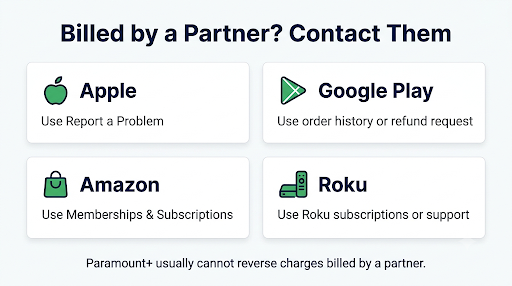
How Do You Get a Paramount+ Refund Through Apple, Google, Amazon, or Roku?
If a partner billed you, the partner controls the refund. Paramount+ support will normally send you back to that company.
Apple (iPhone, iPad, Apple TV)
- Go to Apple’s Report a Problem page and sign in with your Apple Account.
- Choose Request a refund and pick a reason.
- Select the Paramount+ charge and submit.
Apple reviews each request and usually replies by email. Cancelling the subscription itself happens in Settings, under your name, then Subscriptions. The process works the same way for most streaming apps. Our guide on how to cancel Disney+ on iPhone without deleting your account walks through those same iPhone subscription settings step by step.
Google Play (Android)
Open Google Play, go to Payments & subscriptions, then Budget & history, and find the Paramount+ charge. Google says that if it’s been less than 48 hours since the purchase, you can often request a refund directly through Google Play. After that, refunds usually depend on the app developer. See Google Play’s refund help page for the current rules.
Amazon and Roku
For Amazon, check Memberships & Subscriptions in your Amazon account, then contact Amazon customer service about the charge. For Roku, sign in at my.roku.com, review your subscriptions, and contact Roku support for billing questions.
Bundles (Walmart+, Phone Carriers, and Others)
If Paramount+ came free or discounted with another service, the bundle provider usually handles billing. For example, Verizon’s bundle terms say there are no refunds or credits for partial months. Check your provider’s terms before you contact anyone.
What If Paramount+ Charged You After You Cancelled?
First, confirm the cancellation actually went through. Check your email for a cancellation confirmation and look at your Account page. If it still shows an active plan with a next billing date, the cancellation didn’t work.
Then check for these common causes:
- You cancelled the wrong account. Many people have two Paramount+ accounts under different emails.
- You cancelled on the website, but Apple or Google bills you. Deleting the app or cancelling on paramountplus.com won’t stop a partner subscription.
- The charge was for the period before you cancelled. If you cancelled a day after renewal, that charge usually stands.
- You have an add-on or bundle billed separately.
If the cancellation clearly went through and you were still charged, contact support with your confirmation email. This is one of the strongest cases for a refund.
Auto-renewal catches people on almost every streaming service. If you also pay for Disney+, it’s worth learning how Disney+ auto payment works so the same thing doesn’t happen there.
What If You See Paramount+ Charges You Didn’t Authorize?
Paramount+ has a dedicated help topic for charges you didn’t authorize, and it tells you to contact Customer Support. Do that first, but also do these right away:
- Ask your household. A family member may have signed up on a TV or game console using a saved card.
- Search your email for “Paramount+” welcome or receipt emails. These show which email address the account uses.
- Change your passwords if you think someone else got into your account.
- Contact your bank if Paramount+ can’t find an account linked to your card. That can point to card fraud rather than a subscription mix-up.
How Can You Avoid Fake Paramount+ Support Numbers and Scam Sites?
This is a real risk, and most refund guides skip it. Search results for Paramount+ support are full of pages hosted on free help desk tools, forums, and random domains that list phone numbers that don’t belong to Paramount+. Some even mix the real number with a fake one in the same sentence.
Paramount+ has also warned subscribers about an unauthorized website called Single Click Solutions that offered to “disconnect” Paramount+ subscriptions for a fee. You never need to pay a third party to cancel or request a refund.
Protect yourself with these rules:
- Only use contact options you reach from help.paramountplus.com (U.S.) or support.paramountplus.com (international).
- Never give your full card number, card PIN, or a remote access app to anyone who calls you about a refund. Paramount+ itself tells customers not to submit credit card details through support forms.
- Be suspicious of anyone who asks you to pay a fee to process your refund.
- If a “support agent” calls you first, hang up and contact Paramount+ through the Help Center yourself.
What Can You Do If Paramount+ Denies Your Refund?
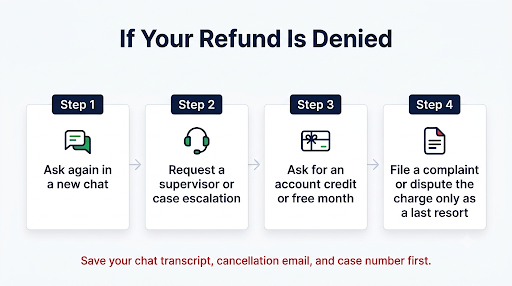
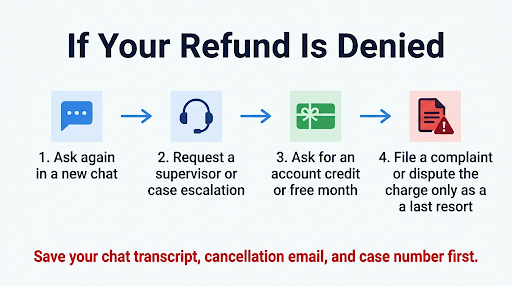
A denial in the first chat doesn’t always mean you’re done. Try these steps in order:
- Ask again, politely, in a new chat. Different agents sometimes make different calls, especially for annual renewals or charges after cancellation.
- Ask for a supervisor or ask to escalate the case.
- Ask for a credit instead. An account credit or a free month is sometimes easier to get than cash back.
- File a complaint with the Better Business Bureau. Paramount+ does respond to BBB complaints, and some get resolved that way.
- Dispute the charge with your bank as a last resort, and only if you have a solid reason, such as an unauthorized charge or a charge after a confirmed cancellation. A chargeback can lead to your account being suspended, so use it carefully.
If you’re fighting billing problems with more than one streaming service, the steps are similar. Here’s how to contact Max customer service for a billing issue if HBO Max is also overcharging you.
Are There Things That Change the Refund Rules?
Yes. A few details affect what you can expect:
- Free trials: Paramount+ was reported to have dropped most free trials for new U.S. subscribers starting in January 2026. If you expected a trial and were charged on day one, check the offer you actually signed up for before you ask for a refund.
- Annual plans: As of 2026, U.S. annual plans cost $89.99 for Essential and $139.99 for Premium. Because that’s a bigger charge, contact support quickly if a renewal surprised you.
- Plan changes: Upgrading usually takes effect immediately. If you switched plans and were charged twice, ask support to review both charges.
- Location: Users outside the U.S. should use the international Help Center at support.paramountplus.com. Some countries have stronger consumer refund laws than the U.S., and support options, including phone access, differ by country.
Frequently Asked Questions
Can I get a Paramount+ refund if I cancel the same day I was charged?
Possibly, but it isn’t guaranteed. Cancel first, then contact live chat right away and explain that you didn’t mean to renew and haven’t streamed since the charge. Same-day requests are much easier to approve than older ones.
Is Paramount+ customer service available 24/7?
Self-help articles on the Help Center are always available. Live agent hours for chat and phone can change, and different sites list different hours. Check the Contact Us page for the current schedule before you reach out.
Does deleting the Paramount+ app cancel my subscription?
No. Deleting the app only removes it from your device. Billing continues until you cancel on your Account page or through the store that bills you, such as Apple or Google Play.
How long does a Paramount+ refund take to show up?
Once a refund is approved, it usually takes a few business days to show on your card, depending on your bank. Apple and Google refunds follow their own timelines. If it hasn’t appeared after a week or two, contact support with your case number.
Can I get a refund for the unused months of an annual Paramount+ plan?
Under the standard terms, cancelling an annual plan stops the next renewal but doesn’t refund the time you have left. If the renewal just happened and you haven’t watched anything, ask support for an exception anyway. Some subscribers report getting one.
Can Paramount+ refund me if I paid through Apple or Google Play?
Usually no. Paramount+ can’t see or reverse payments made through Apple or Google Play. You’ll need to request the refund from Apple or Google directly.
What if I don’t remember which email I used for Paramount+?
Search all your inboxes for “Paramount+” receipts. If you still can’t find it, contact support with the date, amount, and last four digits of the card on the charge. Agents can sometimes find an account that way.
Final Recommendation
Start by checking your bank statement to see who billed you. If it was Paramount+ directly, cancel the plan if you don’t want it, then open live chat at help.paramountplus.com and ask for a refund with the charge date, amount, and a clear reason. If Apple, Google, Amazon, Roku, or a bundle billed you, go straight to that company. Ask soon, keep your chat transcript, and only use contact options from the official Help Center so you don’t end up talking to a scammer.