

To cancel a Hulu subscription billed through PayPal, cancel the plan on your Hulu Account page first, then cancel Hulu’s automatic payment in PayPal. Hulu ends the service. PayPal stops the money. You need both to fully close the loop.
Most people only do one of the two. That’s how you end up with a “payment failed” email from Hulu, or a surprise charge after you thought you were done. This guide walks you through both steps on desktop and mobile, shows you how to spot who is really billing you, and explains what to do if the charges keep coming.
Quick Overview
- Go to hulu.com/account in a web browser (not the Hulu TV app) and sign in.
- Under Your Subscription, select Cancel.
- If Hulu offers a pause or discount, select Continue to Cancel, then Cancel Subscription.
- Check that your Account page says your subscription is about to cancel, and save the confirmation email.
- Log in to PayPal, go to Settings > Payments > Manage automatic payments, select Hulu, and click Cancel.
- If you don’t see Hulu in PayPal, look for Roku, Disney, or Spotify. One of them may be the real biller.
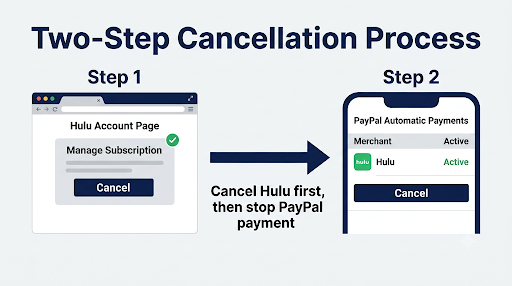
| Step | Where you do it | What it does |
| Cancel the Hulu plan | Hulu Account page (browser) | Ends your subscription at the end of the billing period |
| Cancel the automatic payment | PayPal website or app | Stops Hulu (or the billing partner) from pulling future payments |
Why Do You Need to Cancel in Both Hulu and PayPal?
Because each company only controls its own half. Hulu controls your subscription. PayPal only controls the payment permission you gave Hulu.
Here’s what happens if you skip one side:
- You cancel only in PayPal: Hulu still thinks you’re a subscriber. On your next billing date, the payment fails, and Hulu may flag your account for an unpaid balance or ask you to update your payment method.
- You cancel only in Hulu: Your subscription ends correctly, but the PayPal billing agreement stays linked. It’s not usually charged after cancellation, but it remains an open door if you ever resubscribe or something goes wrong.
PayPal’s own help center explains that stopping an automatic payment does not cancel your agreement with the merchant. So treat the PayPal step as your safety lock, not your cancellation.
Best order: Cancel on Hulu first. Wait until you see the confirmation. Then cancel the automatic payment in PayPal. Doing it in this order avoids a failed payment showing up on your Hulu account before the cancellation goes through.
How Do You Cancel Hulu on the Hulu Website?
You cancel from the Account page in a computer or mobile browser. According to Hulu’s official cancellation instructions, the Hulu-billed process works like this:
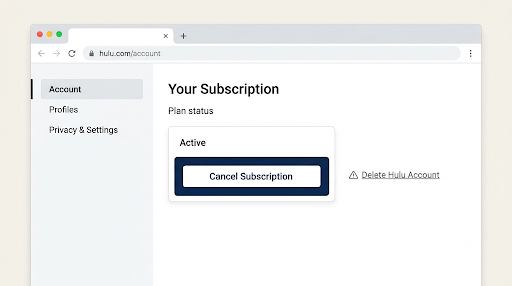
- Open a browser and go to hulu.com/account. Sign in with the email linked to your subscription.
- Find the Your Subscription section (on some layouts it’s a card labeled Cancel your subscription).
- Select Cancel.
- Hulu may show a pause offer, a discount, or a list of shows you’ll miss. Select Continue to Cancel to move past each screen.
- Pick a reason if asked, then select Cancel Subscription.
- Look for the confirmation message and check your inbox for the cancellation email.
Watch out for the “Delete Hulu Account” link. It sits close to the cancel option on the Account page, but it’s a different action. Deleting your account is not the same as canceling, and it’s permanent.
Can You Cancel Hulu From the Hulu App on Your TV or Phone?
Usually not for Hulu-billed plans, which is what a PayPal-funded plan normally is. Hulu’s steps are built for a browser. On your phone, skip the Hulu app and open hulu.com/account in Safari or Chrome instead. The steps are the same as on a computer.
How Do You Know the Cancellation Actually Worked?
Check the Overview section of your Account page. Hulu says that once cancellation succeeds, you’ll see a message that your subscription is about to cancel, and you keep access for the rest of the period you already paid for.
If the page still shows Your Next Charge with a date, the cancellation didn’t go through. Run the steps again. Hulu’s page on what to do if you thought you canceled covers this exact situation.
How Do You Cancel Hulu’s Automatic Payment in PayPal?
Go to PayPal’s automatic payments list, select Hulu, and cancel it. The menu names differ slightly between the website and the app.
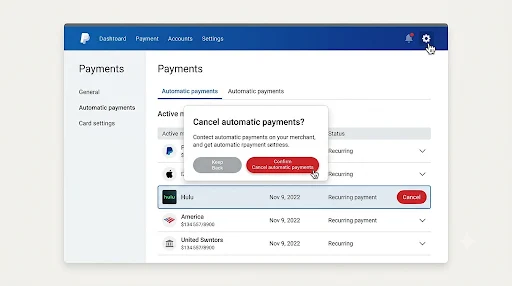
On the PayPal Website
- Log in at paypal.com.
- Click the Settings gear icon in the upper right.
- Open the Payments tab.
- Click Manage automatic payments. Some accounts show Subscriptions and saved businesses instead.
- Select Hulu from the list of merchants.
- Click Cancel, then confirm by clicking Cancel Automatic Payments (or Cancel Profile).
On the PayPal App (iPhone and Android)
- Open the PayPal app and tap Menu (or Me, depending on your version).
- Tap Subscriptions or Linked Businesses.
- Tap Hulu.
- Tap Account or Manage, then choose Stop Paying with PayPal or Unlink.
- Tap Unlink again to confirm.
These are the steps from PayPal’s help article on canceling automatic payments. If the app menus look different on your phone, use the website. It shows every merchant more clearly.
One thing to know before you click: PayPal says you can’t reactivate a recurring payment after you cancel it. If you come back to Hulu later, you’ll simply add PayPal again as your payment method during signup.
What If Hulu Isn’t Listed in Your PayPal Automatic Payments?
Then someone other than Hulu is probably billing you.
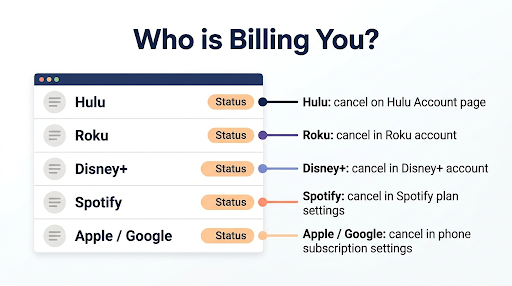
This is the most common reason people get stuck in a loop where Hulu sends them somewhere else and nobody seems able to cancel.
Check your PayPal activity and your bank statement for the merchant name. Here’s what it usually means:
| Merchant name you see | Who is billing you | Where to cancel |
| Hulu, PAYPAL *HULU, or HULU.COM/BILL | Hulu directly | Hulu Account page, then PayPal |
| Roku, Inc. or ROKU FOR HULU | Roku | Your Roku account at my.roku.com or the Roku device, then PayPal (merchant: Roku) |
| Disney Plus or Disney Bundle | Disney+ | Your Disney+ account, then PayPal (merchant: Disney) |
| Spotify | Spotify (Premium Student with Hulu) | Your Spotify account plan settings |
| Apple or Google | App Store or Google Play (funded by PayPal) | iPhone Subscriptions settings or Google Play Subscriptions |
Roku is the big one here. Many people signed up for Hulu on a Roku TV years ago, paid with PayPal, and now see “Roku, Inc.” in PayPal instead of Hulu. In that case, Hulu can’t cancel it for you. You cancel the Hulu channel subscription in your Roku account, then cancel the Roku automatic payment in PayPal if you don’t use Roku for any other paid subscriptions.
Tip: On your Hulu Account page, look at the payment or billing section. If it names a partner like Roku, Disney+, or Apple, that partner is the one you need to cancel with.
What If the Cancel Button Is Missing or Grayed Out?
A missing or grayed-out Cancel option almost always means a third party manages your billing. Hulu can’t end a subscription it doesn’t bill. Use the table above to find the right company.
Other causes worth checking:
- You’re signed in to the wrong Hulu account. If you have two emails, the one that’s charged might not be the one you’re logged into. Search your inbox for Hulu receipts to find the right email.
- You’re in the Hulu app. Switch to a browser.
- You’re trying to cancel an add-on. Add-ons like premium channels are managed separately from the base plan.
- You’re on a Disney Bundle. Canceling Hulu may cancel the whole bundle. Hulu shows a warning screen before it does this, so read it carefully.
Why Are You Still Being Charged After Canceling Hulu?
There’s usually a simple reason. Work through these in order:
- The charge came before your cancellation took effect. If you canceled on or just before your renewal date, that cycle’s payment may already have processed.
- The cancellation never finished. If you closed the browser on a retention offer screen, nothing was canceled. Check for Your Next Charge on your Account page.
- You paused instead of canceled. A pause lasts up to 12 weeks, and then billing restarts automatically.
- A different company is billing you. Check the merchant name in PayPal. Roku and Disney are the usual suspects.
- There’s a second Hulu account. A family member or an old email may have its own active plan.
If none of those explain it, contact Hulu through the Help Center. If Hulu or the billing partner won’t fix a charge you didn’t authorize, you can open a dispute in PayPal’s Resolution Center. Do that only after you’ve tried the merchant, since PayPal asks you to try resolving it with the seller first.
What If You Can’t Log In to Hulu to Cancel?
Reset your password first using the “Forgot your email or password?” link on the Hulu login page. If you don’t remember which email you used, search your inbox (and spam folder) for Hulu receipts, or check the PayPal transaction details, which often show the email tied to the payment.
If you still can’t get in, you’ll need Hulu support. Here’s a guide on how to reach Hulu customer service when you can’t log in. Have your PayPal transaction ID and the charge dates ready. That speeds things up a lot.
In the meantime, canceling the automatic payment in PayPal will stop future payments while you sort out account access.
How Can You Avoid Fake Hulu Support Numbers?
Only contact Hulu through help.hulu.com. Search results for Hulu cancellation are full of forum posts, PDF files, and “help” pages that list phone numbers labeled “official.” They are not Hulu.
Scammers use these numbers to ask for your PayPal login, card number, or a one-time code, or to get you to install remote access software. A few warning signs:
- The number appears on a forum, community board, or random PDF instead of hulu.com.
- The page repeats the phone number over and over in the middle of sentences.
- The “agent” asks for your PayPal password, a verification code, or gift cards.
- They say they need to “refund” you through a remote screen-sharing app.
Hulu’s real support starts from the Help Center. Go to the Contact Us page, choose Account & Billing, select Cancel, and start a chat. Hulu and PayPal will never ask for your password over the phone.
Should You Pause Hulu Instead of Canceling?
Pause if you’re taking a short break. Cancel if you’re done. A pause stops billing for up to 12 weeks, then your plan restarts and PayPal is charged again automatically.
Pausing isn’t available for everyone. Annual plans, promotional plans, gift card balances, and most third-party-billed plans typically can’t be paused. If you don’t see a pause option, that’s likely why.
If you know you’re leaving for good, skip the pause offer. It’s the main reason people get billed months after they “canceled.”
Common Mistakes to Avoid
- Only removing PayPal as the payment method. Hulu will just ask you to add a new one or mark the payment as failed.
- Deleting the Hulu app from your TV or phone. Uninstalling the app does not cancel anything.
- Clicking “Delete Hulu Account” instead of Cancel. You lose your profiles and watch history, and you may still need to sort out billing.
- Closing the tab on the offer screen. The cancellation isn’t complete until you see the confirmation.
- Canceling the wrong PayPal merchant. If Roku bills you for several channels, canceling Roku in PayPal affects all of them.
- Waiting until the renewal day. Cancel at least a day or two before your next billing date to be safe.
Frequently Asked Questions
Will I get a refund if I cancel Hulu partway through the month?
Usually no. Hulu generally doesn’t give prorated refunds for unused days. Instead, you keep watching until the end of the period you already paid for. If you were charged after a cancellation that went through, contact Hulu support with your confirmation email.
Can I switch my Hulu payment from PayPal to a card instead of canceling?
Yes. On your Hulu Account page, find Payment Information and select Update Payment next to Payment Method. Add your card, then cancel the old Hulu automatic payment in PayPal so it isn’t left linked.
Does canceling Hulu also cancel Disney+ or ESPN+?
It can if you’re on a Disney Bundle. Canceling the bundle can end all the services in it. Hulu shows a warning screen before you confirm. If you want to keep Disney+, change your plan instead of canceling outright.
Will PayPal notify Hulu when I cancel the automatic payment?
PayPal stops authorizing future payments to that merchant and emails you a confirmation. But it does not end your Hulu subscription. Hulu will only see a failed payment on your next billing date, which is why you should cancel on Hulu too.
Can I still log in to Hulu after canceling?
Yes. Your account stays open, so you can sign in, see your Account page, and resubscribe any time. You just can’t stream once your paid period ends. Account deletion is a separate step under Privacy and Settings.
I canceled a Hulu free trial that I started with PayPal. Do I need to do anything in PayPal?
It’s a good idea. Canceling the trial on Hulu stops the first charge, but the billing agreement can stay in PayPal. Remove it under Manage automatic payments so nothing is linked to Hulu going forward.
Final Recommendation
If PayPal shows Hulu as the merchant, cancel on your Hulu Account page in a browser, wait for the “about to cancel” confirmation, and then cancel Hulu’s automatic payment in PayPal. That’s the cleanest way to stop all future charges.
If PayPal shows Roku, Disney, or another company, cancel with that company first. Then take a screenshot of each confirmation and check your PayPal activity after your next billing date. If a charge still shows up, contact Hulu only through help.hulu.com, and use PayPal’s Resolution Center as a backup.