
To cancel Amazon Prime before your renewal date, go to Account & Lists > Prime Membership > Manage Membership > End Membership, then pick the option that ends Prime on your renewal date. That turns off auto-renewal, so you won’t be charged again, and you keep Prime until the date shown.
The catch is that Amazon shows several screens before the cancellation is final. Some offer a pause, a reminder, or a cheaper plan instead. This guide walks you through each screen on desktop and the app, explains the refund rules most guides get wrong, and shows you how to confirm the cancellation actually went through.
Quick Overview
- Where to cancel: Your Prime Membership page (Account & Lists > Prime > Manage Membership).
- Best option before renewal: Choose the option that ends Prime on your renewal date, such as “End on [date]” if shown. This stops the next charge while keeping benefits until the end date.
- Refund: Not automatic. It depends on timing and whether you used any Prime benefits since your last charge.
- Billed by Apple, Google Play, or a phone carrier? Cancel through that company, not on Amazon.
- Confirm it worked: Your Prime page should show an end date instead of a renewal date.
- Timing tip: Cancel at least a day or two early. Don’t wait until the morning of your renewal date.
What Happens When You Cancel Amazon Prime Before the Renewal Date?
When you cancel before renewal, your renewal date becomes your end date. Amazon won’t charge you again, and your Prime benefits keep working until that day.
Amazon India’s help page says this plainly: after you cancel, there are no further charges and you keep access until the end date. You can read Amazon’s official Prime cancellation help page for the exact wording. The U.S. experience works the same way when you pick the end-on-renewal-date option.
Here is what that means in real life:
- Your free shipping, Prime Video, Prime Reading, and other perks continue until the end date.
- On the end date, your account becomes a regular free Amazon account.
- Your order history, addresses, wish lists, and saved payment methods stay put.
- You can rejoin later if you change your mind, often from the same page.
Example: Say your annual Prime renews on March 14 and you cancel on February 20. Amazon shows “End on March 14.” You keep shipping and streaming through March 14, and no new charge hits your card on renewal day.
“End Now” vs. “End on Renewal Date”: Which Should You Pick?
Some accounts see two choices on the final screen. They lead to very different results.
| Option | When benefits stop | Refund | Best for |
| End on [renewal date] | On your renewal date | Usually none, since you keep using what you paid for | Most people who just want to avoid the next charge |
| End now (with refund, if offered) | Immediately | Full or partial, based on what Amazon shows you | People who just got charged and haven’t used Prime since |
If you’re cancelling ahead of time, “End on [date]” is almost always the right move. You’ve already paid for those days, so you might as well use them.
How Do You Check Your Amazon Prime Renewal Date?
Your renewal date sits right on your Prime Membership page. Check it first, because it tells you how much time you have and whether you’re close to a charge.
- Sign in to Amazon on a browser or the Amazon Shopping app.
- Go to Account & Lists (desktop) or the profile icon (app).
- Open Prime or Your Prime Membership.
- Look for the line that shows your plan, price, and next payment or renewal date.
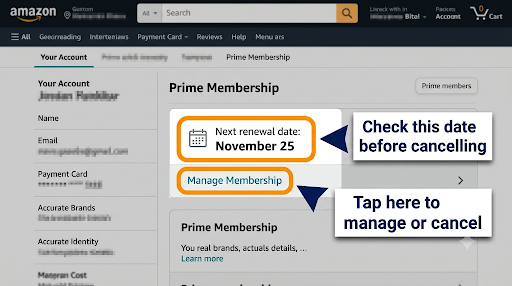
While you’re there, note three things: your plan type (monthly or annual), the payment method, and who bills you. If the page says your membership is managed by another company, skip to the third-party section below.
How to Cancel Amazon Prime Before Renewal Date on Desktop
Desktop is the easiest place to cancel because every option is clearly labeled on one wide screen.
- Go to Amazon.com (or your country’s Amazon site) and sign in to the account that pays for Prime.
- Hover over Account & Lists in the top-right corner and select Prime Membership.
- Click Manage Membership near the top right. On some accounts it reads Update, cancel and more.
- Select End Membership (sometimes labeled “End membership and benefits” or “Cancel membership”).
- Amazon shows what you’ve saved and what you’ll lose. Click Continue to cancel.
- You may see offers to switch plans, pause, or get a reminder. Skip them if you want to fully cancel.
- On the final screen, click End on [your renewal date].
- Look for a confirmation message that names your end date.
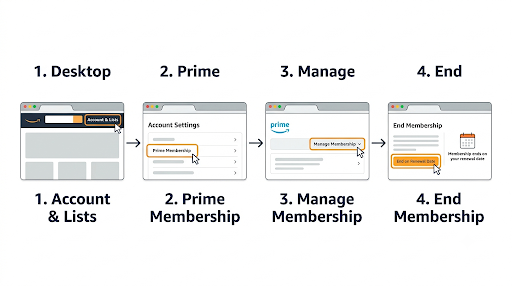
Common mistake: Closing the tab after the first or second screen. Until you see a final message with an end date, Prime is still set to renew.
How to Cancel Amazon Prime Before Renewal Date on the Amazon App
The steps are nearly the same in the Amazon Shopping app on iPhone or Android. The buttons are just in different places.
- Open the Amazon Shopping app and sign in.
- Tap the profile icon at the bottom of the screen.
- Tap Your Account, then find Memberships & subscriptions or Prime Membership. You can also tap the Prime logo at the top of the home screen.
- Tap Manage Prime Membership, then Manage membership.
- Tap End membership.
- Scroll past the savings summary and tap Continue to cancel.
- Decline any pause or plan-change offers, then tap End on [date].
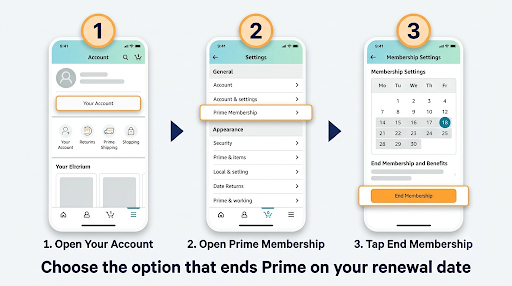
Menu labels shift between app versions and regions. If you can’t find the right screen, type “Prime membership” into the app’s search bar or open Amazon in your phone’s browser instead. The website version often makes the cancel option easier to spot.
Cancelling on iPhone vs. Android: Is There a Difference?
If you signed up directly with Amazon, there’s no difference. Cancel inside the Amazon app or on the website.
It only changes if Apple or Google bills you. Then the Amazon app may send you to that store’s subscription settings, because Amazon can’t stop a charge it doesn’t control.
What If Google Play, Apple, or Another Company Bills Your Prime?
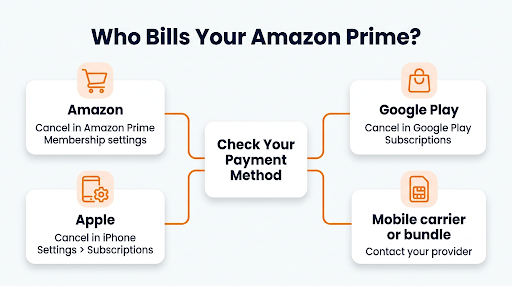
If a third party bills your Prime membership, you have to cancel through that company. Cancelling on Amazon won’t stop their charge, and sometimes Amazon won’t show a cancel button at all.
Amazon’s Prime Terms and Conditions say memberships bought through another company follow that company’s cancellation and refund rules. This is common in a few situations:
- Google Play billing: Common for Android users in India who paid for Prime or Prime Lite through Google Play. Open the Play Store, tap your profile picture, go to Payments & subscriptions > Subscriptions, choose Amazon Prime, and tap Cancel subscription. Google explains this in its Google Play guide to cancelling subscriptions.
- Apple billing: On iPhone, go to Settings > your name > Subscriptions, then pick the Amazon subscription and cancel it.
- Phone carrier or bundle deals: If Prime came with a mobile, broadband, or TV plan, contact that provider. Cancelling the bundle may or may not end Prime, so ask before you change your plan.
How to tell who bills you: Check your bank or card statement. A charge from “Google,” “Apple.com/bill,” or your carrier means you cancel there. A charge from “Amazon Prime” or “AMZN” means you cancel on Amazon.
Can You Get a Refund After Cancelling Amazon Prime?
Sometimes, but not always. A refund depends on when you cancel and whether you used any Prime benefits since your last charge. Cancelling before your renewal date usually means there’s nothing to refund, because you haven’t been charged yet.
Here’s how the rules work, based on Amazon’s terms and help pages:
| Your situation | What usually happens |
| You cancel before renewal and choose “End on [date]” | No new charge. No refund, because you keep the time you paid for. |
| You cancel within 3 business days of signing up or converting from a free trial | Amazon’s U.S. terms promise a full refund, though Amazon may hold back the value of any benefits you used in those 3 days. |
| You were just charged and haven’t used any Prime benefits since | Amazon says paid members who haven’t used benefits can get a refund of the current period. |
| You used benefits after the charge (shipping, streaming, deals) | A refund is less likely. Amazon decides based on what it shows at the cancel screen. |
| Annual Prime, Prime Lite, or Prime Shopping Edition in India | Full refund only if you made no eligible purchases and used no Prime benefits since the latest charge. |
Don’t count on a prorated refund. Plenty of articles say Amazon refunds the unused months automatically. Amazon’s own pages don’t promise that. If a refund is available, the cancel screen will show you the amount before you confirm.
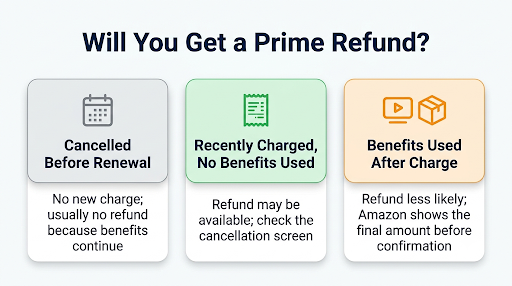
What counts as “using benefits”? Think Prime shipping on an order, streaming a Prime Video title, reading a Prime Reading book, or grabbing a Prime-only deal. Even one of these after your renewal can make a full refund harder to get.
Approved refunds usually go back to your original payment method. Banks can take several business days to post the credit, so give it about a week before you follow up.
How Do You Cancel an Amazon Prime Free Trial Before It Renews?
You cancel a free trial the same way as a paid membership. The final button usually says End trial and benefits or End on [date].
Cancel any time before the trial ends and you won’t pay anything. You’ll usually still get the rest of the trial period too, so there’s no reason to wait until the last day.
This matters for Prime Student and Prime for Young Adults as well. Those trials are often longer, so it’s easy to forget when they end. If you only want the trial, cancel right after you sign up and choose to keep benefits until the trial end date.
One thing that trips people up: if you forget and the trial converts to paid, Amazon’s U.S. terms give you a 3-business-day window to cancel for a full refund. Amazon may hold back the value of any benefits you used during those days, so stop using Prime while you sort it out.
How to Cancel Prime Lite or Other Prime Plans in India
Prime Lite and Prime Shopping Edition cancel from the same Manage Membership page as regular Prime. The difference is how you paid and which refund rule applies.
- Paid on Amazon.in directly: Use Account & Lists > Prime > Manage Membership > End Membership.
- Paid through Google Play: Cancel in the Play Store under Payments & subscriptions.
- Paid with UPI Autopay or a card mandate: Cancelling Prime on Amazon stops the renewal. You can also check your UPI app or bank for the active mandate and confirm it shows as cancelled or paused, so no stray debit happens.
Because of RBI rules on recurring payments, Indian banks often send a pre-debit alert before an auto-renewal. If you get one for Prime and didn’t mean to renew, that’s your cue to cancel right away.
Should You Pause Amazon Prime Instead of Cancelling?
Pausing makes sense if you plan to come back soon. Cancelling makes sense if you’re done for now or unsure.
Where Amazon offers a pause, it appears during the cancel flow. Based on Amazon’s help pages, monthly plans can pause for a month and then resume automatically, and monthly or annual plans can pause for up to a year with a manual restart. While paused, you don’t pay, but you also don’t get Prime benefits.
Watch out: A paused membership is not a cancelled one. If you forget about it, it may restart and charge you. If your goal is to stop paying for sure, choose “End on [date].”
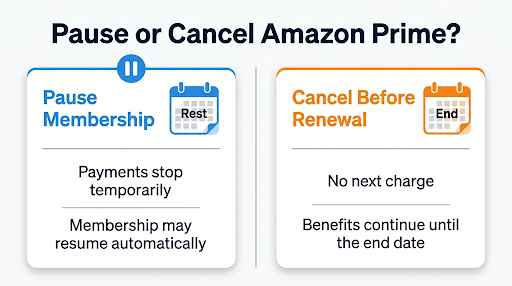
Not ready to decide? Amazon also offers a reminder option that emails you a few days before renewal. That’s a good middle ground if you’re on the fence and want one more month to think.
What Else Stops (or Keeps Charging) When Prime Ends?
This is the part most cancellation guides skip. Prime ending doesn’t automatically clean up every related charge or perk.
Things that stop when Prime ends
- Free Prime shipping and Prime-only deals. Orders after your end date follow regular shipping rules.
- Shared benefits through Amazon Household. If you share Prime with another adult in your household, they lose those shared perks too. Give them a heads-up.
- Prime Video’s included catalog. Titles that came with Prime disappear from your watchlist. Movies or shows you bought separately stay in your library.
- Extra Amazon Photos storage. Prime includes extra photo storage. If you rely on it, check your storage and back up important photos before your end date.
Things that keep charging unless you cancel them separately
- Prime Video add-on channels. Channels you subscribed to inside Prime Video are billed separately. Check your Memberships & Subscriptions page and cancel any you don’t want.
- Kindle Unlimited, Audible, and Amazon Music Unlimited. These are their own subscriptions with their own renewal dates.
- Subscribe & Save deliveries. Scheduled orders keep shipping. Review them so you’re not surprised by a delivery or a price change.
A quick visit to Your Memberships & Subscriptions on Amazon shows everything still active in one list. It takes two minutes and can save you from a charge you forgot about.
How Do You Confirm Your Prime Cancellation Worked?
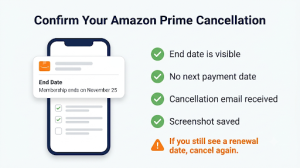
Go back to your Prime Membership page after you cancel. It should show an end date, not a renewal date. That’s the clearest proof the auto-renewal is off.
Then do these quick checks:
- Look for a cancellation confirmation email from Amazon.
- Take a screenshot of the page showing your end date. It helps if you ever need to dispute a charge.
- If the page still shows a “next payment” date, the cancellation didn’t finish. Go through the steps again and click all the way to the final screen.
- Make sure you cancelled on the right account. People with two Amazon accounts (or a family member’s account) often cancel the wrong one.
What Should You Do If Amazon Prime Renews Before You Cancel?
Cancel right away and stop using Prime benefits. The sooner you act after a renewal charge, the better your chance of a refund.
- Go to Manage Membership and start the cancellation.
- If Amazon offers an End now option with a refund amount, review it and accept if you’re okay losing access immediately.
- Don’t place Prime orders or stream Prime Video while you wait.
- If no refund option appears, contact Amazon through the Help section of your account. Share the charge date, the amount, and whether you used any benefits since.
If you need help with a refund that didn’t show up, a charge you don’t recognize, or a cancellation that won’t go through, this guide on how to reach Amazon Prime customer service walks you through your contact options.
Also keep in mind that a failed payment doesn’t cancel Prime. If your card expires or gets declined, Amazon may suspend your benefits and try again later. Under its terms, once you add a working payment method and the charge goes through, your membership period runs from the original renewal date. So removing your card is not a safe way to cancel.
Be Careful with “Amazon Prime Cancellation” Phone Numbers
Search results for Prime cancellation often include forum posts and study-guide pages stuffed with phone numbers claiming to be Amazon support. These are not official Amazon numbers. They usually lead to scammers who ask for remote access to your device, gift cards, or your banking details.
You never need to call anyone to cancel Prime. Amazon lets you do it yourself in a few clicks. If you do need a person, start from the Help or Customer Service section inside your Amazon account, not from a number you found on a random web page.
Red flags to watch for:
- Someone asks you to install an app like AnyDesk or TeamViewer.
- You’re told to buy gift cards to “process a refund.”
- A caller says your account has been charged a large amount and needs urgent action.
- The number appears on a forum, Quizlet page, or social media post instead of on Amazon’s site.
Is Cancelling Amazon Prime Easier Now in the U.S.?
Yes, it’s supposed to be. In September 2025, Amazon agreed to a $2.5 billion settlement with the Federal Trade Commission over allegations about Prime sign-ups and cancellations. Amazon did not admit wrongdoing.
As part of that settlement, Amazon must make cancellation simple and not confusing or time-consuming, and it must clearly disclose auto-renewal terms. In practice, you may still see a retention offer or two, but you should always be able to reach a clear final cancel button. If you can’t, that’s worth reporting to Amazon customer service.
Frequently Asked Questions
How many days before renewal should I cancel Amazon Prime?
Aim for at least one or two days before your renewal date. Amazon lets you cancel any time before renewal, but leaving it to the last few hours risks a charge going through first, especially with time zone differences or a slow cancel flow. Cancelling weeks early costs you nothing, since you keep benefits until the end date anyway.
Will I lose my order history or Amazon account if I cancel Prime?
No. Cancelling Prime only ends the membership. Your account, order history, saved addresses, wish lists, Kindle books, and digital purchases all stay. Deleting your Amazon account is a separate, permanent process, so don’t confuse the two.
Can I switch from annual to monthly Prime instead of cancelling?
Often, yes. Amazon may offer a plan switch during the cancel flow or under Manage Membership. This works well if paying a full year upfront is the real issue. In the U.S., the standard prices as of late 2026 are $14.99 a month or $139 a year before tax, so monthly costs more over twelve months but gives you a quick way out.
Why does Amazon Prime keep renewing after I cancelled?
Usually one of three reasons: the cancellation never reached the final screen, you cancelled on a different Amazon account, or a third party like Google Play or Apple bills your membership. Check your Prime page for an end date, confirm which email you signed in with, and look at your bank statement to see who’s charging you.
Can I rejoin Prime after cancelling, and will I get another free trial?
You can rejoin any time, and if your membership hasn’t ended yet, Amazon usually shows a “Continue membership” or similar button to undo the cancellation. Free trial eligibility is a different story. Amazon generally reserves trials for customers who haven’t had Prime or a trial recently, and it decides eligibility per account.
Does cancelling Prime cancel my Prime Video channels?
Don’t assume so. Channels are separate subscriptions with their own billing. Some may stop working without Prime, while charges can continue until you cancel them. Go to Your Memberships & Subscriptions and cancel each channel you don’t want.
Our Recommendation
If you want to stop paying for Prime, cancel today and choose End on [your renewal date]. You lose nothing by cancelling early, and you remove the risk of forgetting.
Before you finish, take two extra minutes to check who bills you, review your other Amazon subscriptions, and confirm your Prime page shows an end date. If you were just charged and haven’t used Prime since, look for a refund option on the cancel screen. And if anything looks off, go through Amazon’s official help channels, never a phone number from a forum post.